Since we launched news sharing in groups, users have shared nearly a million articles with professional colleagues.
The obvious desire for people to share and discuss news with their peers begged for us to develop more ways for people to collaborate on the numerous streams of news intelligence coming from publishers and bloggers.
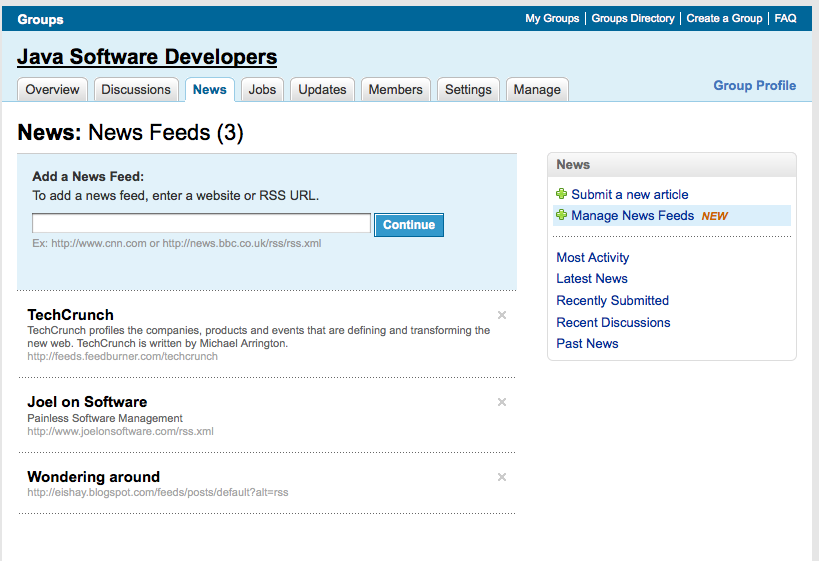
This week we are launching a feature that will allow group owners and managers to create a custom news stream composed of RSS or Atom feeds that will be relevant for the group. By adding an RSS feed, Atom feed, or just web site URL, managers will be able to create a feed tailored specifically for their group.
Group members will benefit by having a comprehensive news digest readily available to them on LinkedIn. It can be a great way to discover new blogs and sources because they were shared in to the group and last, but not least, group members can discuss hot topics that are a result of this stream.
If your group manager has enabled news and discussions, you can find this feature under news tab in “Latest News”. If your group manager has not added a feed that you think would be a valuable inclusion for the group, send them a message with your suggestion.

We hope you enjoy the latest news feature that will allow you to consume, discuss, and collaborate on news within your groups. As always, we are looking forward to your feedback and comments on this blog post as you consume news in a whole new way on the web.
- Topics:
- Groups,
- New LinkedIn Features


Comments
Quite a few of my rss feeds that I am trying to submit are being rejected by the Linkedin “reader” for my group. What are the restrictions around acceptable rss feeds?
A SUGESTION for groups improvement: why don’t you show a statistic of group members in the group profile section. You have geografic, and profilling information about all that can be usefull to show to identify the profile of the group
I am also trying to add the correct URL for an RSS feed but it it getting rejected.
HELP US.
@ Sean and Scott – what are the URLs you are trying to add? As long as they are RSS 1.0, RSS 2.0, or Atom you should be able to add them. You can also try just adding the website that the URLs are from and they might show up in the list of
feed options you can select from.
Please comment back with the URLs that are giving you problems and I will investigate.
Great idea, but the LinkedIn RSS reader seems a bit idiosyncratic. For example, I can’t even get my own blog feed, to appear on my profile page. LinkedIn complains that “The feed URL http://thenoisychannel.com/feed/?feed=rss2 is inaccessible.” Not inaccessible in my browser!
This is a good addition to LinkedIn Groups and I am looking forward to using it.
D
Great addition!
But as many others has stated, it very often rejects the feeds.
If you need a test case, try this one from Yahoo Pipes:
http://pipes.yahoo.com/pipes/pipe.run?_id=8llM7pvk3RGFfPy4pgt1Yg&_render=rss
Also my feed is not being shown although it is RSS 2.0
How?
Hi!
Is it possible to make an RSS feed out of the activity of group in order to make a widget and promote the group from outside LinkedIn (e.g. in my blog?)
Regards,
M.Heredia
This functionality doesn’t exist today but I’m forwarding it on to the product owner for consideration in future releases. Thanks for your feedback!
Hey All,
Thank you for your comments and letting us know there have been some issues with adding feeds.
Our current RSS parser seems to have trouble with certain non-well formed RSS feeds. This seems to affect about 5% of RSS feeds submitted so far according to our logs. We’ll add a more lenient RSS parser which will handle those non-well formed feeds in a future release (hopefully in the next two weeks).
Please make sure it can accept an RSS feed that comes from Google search.
This would allow a moderator to keep the information up-to-date for their group by pulling in an RSS feed based upon “current news” and then pull it when its “not so current.”
Its a different approach to the usual RSS feeds that come from blogs or ongoing publications. Just a thought for you group moderators out there.
~ Sean Rehder
I would like to take my News tab’s combined output of about 30 RSS feeds I’ve added, and turn it into one Group RSS feed. Can you enable that?
I added an RSS feed to a group, but I now want to remove it. I see how I can delete an individual item, but how can I remove an entire feed?
@ Trista -A group owner/manager can delete any RSS feed that has been added by clicking on the ‘Manage News Feeds’ link found on the right navigational area of your group’s ‘News’ tab. This should provide you with a listing of all of your news feeds. Clicking on the gray “X” on the particular news feed will remove it. Good luck with your group!
Jen, I have a question as an owner/manager of several groups. This question came from a client who also manages a group, and I can’t find information in help or anywhere.
Group owners used to be able to export group member information (firstname, lastname, email), but sometime that functionality went away. Is there a new way to do this, or has it gone away due to capturing/spamming. Of course, I see that you have introduced the new ability to send a max of one group communication per week. Can you verify that it’s no longer possible to export and how group owners could do it now?
Thanks- Chris
In addition to LinkedIn rejecting some valid feed URLs, there is also a weird caching problem. This happens with feed URLs that use query parameters to filter the feed based on tags, etc. For example, if I add the following feed to one of my groups:
http://community.tigranetworks.co.uk/blogs/tim_long/rss.aspx?Tags=ASCOM&AndTags=1
This works, but then when I try to add a similar URL to a different group:
http://community.tigranetworks.co.uk/blogs/tim_long/rss.aspx?Tags=Astronomy&AndTags=1
This second URL is ignored and the first URL is used instead. Clearly, that results in the wrong content being syndicated, so this is a serious usability problem.
–Tim Long
@Tim- I’ve passed on your request to the appropriate team and they are working to identify the issue right now. I’ll make sure we provide an update once it’s resolved. Thanks for the heads up!
Doesn’t work!!!
Just rejects every RSS I have tried to add!
D
Is there a maximum number of RSS feeds that can go into one group?
~ Sean Rehder
@Sean – You can post a maximum of 30 RSS feeds to your group’s news section. That should give the plenty of reading material.
@Jen You guys on track for the new parser? Having trouble adding: http://madmariner.com/news/rss/feed. Thanks.
RSS Reader is rejecting the below feeds. Why?
http://rss.jobsearch.monster.com/rssquery.ashx?q=Vice President&where=Denver2c+CO&lid=363&rad=20&rad_units=miles&qlt=1297391&qln=750153&cy=us&brd=1&baseurl=jobview.monster.com
http://rss.indeed.com/rss?q=Vice+President&l=Denver%2C+Colorado
Cannot add the URL below or many others.
Group members don’t care why there are no interesting news feeds in a group … they will simply visit other sites.
feed://search.issuu.com/used_boat_watch_feb_2009/docs/recent.rss
we are trying to put a valid feed (http://www.sgia.org/rss/executive_update.xml), that passes W3 validator with flying colors ( http://validator.w3.org/feed ) – but it just does not show up on linked in. If its a matter of strictness – one would think that regardless of how strict LinkedIn parser is, it should accept feeds considered to be valid by W3.org. We are excited by this new feature and are looking forward to its more lenient implementation.
Thank you, guys!
@Michael – Changes made last Thursday should have resolved your issue. Please contact Customer Service if you continue to have RSS issues as it becomes hard to troubleshoot through a forum like this.
I also had problems submitting a feed from yahoo pipes
http://pipes.yahoo.com/pipes/pipe.run?_id=2CuqVJAF3hGn6CPq_g6H4A&_render=rss
Feed now added but won’t post news
I have added the following RSS feed to my group, it wasn’t accepting the feed at first (I have now got round this problem) but unfortunately it isn’t posting any news stories to the news feed of the group, why is this please?
http://constructionweekonline.com/index.php/rssFeed/WebRssFeeds/NEWS
@Nick – Yes we were very happy to get the RSS feed requirements tweaked last Thursday to allow more group users to add their feed without errors. Please contact Customer Service with their link posted at the bottom of most LinkedIn pages. We will be glad to help you trouble shoot why new still isn’t posting.
I just wanted to share my experience trying to add a WordPress blog to my LinkedIn profile. If you are having issues – e.g. getting a “….feed=rss2 is inaccessible.” error message when saving the link to your blog, the problem may be the blog itself. In my case, I am hosting my own blog using a dynamic DNS service to route requests to my home server.
Simple flow diagram of how requests to my blog site get handled:
User(s) go to –> –> –>
If I put in the WordPress LinkedIn app URL for , I was getting the error above “…feed=rss2 is inaccessible.” If I put in the Dynamic DNS hostname, everything is gravy. The LinkedIn WordPress app was seeing an HTML frame when trying to parse URL and would error out.
Try this workaround if it applies to you and a handful of the other 5% crowd who can’t add their blog website to their LinkedIn profile. BTW, using the W3C validator tool was invaluable to determine if my site was a valid RSS feed so use it first:
http://validator.w3.org/feed/
JB
What a great pity rss-feeds dont work. Would have been a great feature.
@ John – RSS has been a great hit with groups so it sounds like there may be some isolated events. Its hard to know what the issue is with the detail you have provided but please contact Customer Support so the team can trouble shoot your specific issue. Click on Customer Service at the bottom of your home page and search for RSS. If you don’t find your answer click on the Ask Customer Service tab that will appear after searching. This will allow you to submit a ticket with the specific issue you are experiencing and a screen shot if you have one.
Hi, I still have a problem with my RSS feed on linked in:
The feed URL http://www.ablemarkets.com/?feed=rss2 is inaccessible.
You keep referring to “well-formatted” feeds; do you have guidelines on what feeds are well-formatted?
Thanks!
@Irene – The link you provided is a web page with an rss feed embedded. Unfortunately, most feed parsers will not be smart enough to figure this out.
Feeds can be validated via: http://validator.w3.org/feed/
At the minimum, if you ‘View Source’ on the page, it MUST begin with “<?xml” tag before anything else according to the RSS or Atom feed specs.
I hope this helps!
Dirk
Will you be adding RSS feeds for discussions, jobs etc? It is too time consuming to go into each group and navigate through all of the tabs.
@John I can’t say whether this is a feature yet to be released but I have forwarded your comment on to the product owners for future consideration in the development of Groups.
Thanks!
Dirk
I added my feed (below) 3 days ago, the feed was read, and news stories were posted to the group. Unfortunately, there have been no new news stories posted to the group since I originally added the feed on Tuesday. What gives?
http://www.buildingonline.com/news/rss09.xml
Trying to get the WP app going (looks cool) but I am getting the same error message.
“The feed URL http://www.supercloud.com/blog?feed=rss2 is inaccessible.”
The validation thing says “XML parsing error: :70:0: unclosed CDATA section”
Brand new version of WordPress 2.7.1
Have not touched the code. When I look at the feed it looks fine to me. Starts with “<?xml” rss version 2.0. yadda
Any ideas?
Matt
@Matt – Please contact our Customer Service Group and they can help trouble shoot your issue.
Dirk
I’m trying to add my blog at npfunds.com/blog but am also getting the error The feed is inaccessible. My feed has been approved by the w3c validation.
Is there any way of exporting content out of the groups via rss? So people can subscribe to a groups discussions or jobs via rss?
@Adi- That functionality doesn’t exist at this time. I know the Product developers have this on their list to consider in future enhancements.
Linked in may also want to consider that many WordPress webmasters change their permalinks structure to be more SEO friendly, to the /%category%/%postname%/ setting, which changes the way the blog displays it’s links from the ones with the ?=blahblah to /nice/directory/structures ….
Also, Google Chrome web browser seems to be unsupported for displaying the feeds within linkedin.
I was able to add a linkedin tagged entry, but it took only one and does not display the others, and randomly displays the error that everyone here is complaining about. This is a LinkedIn issue, NOT a WordPress or other issue.
I can’t seem to get my blog feed working either. Here is the RSS feed:
http://brandsthatthink.com/?feed=rss2
Any assistance would be much appreciated!
@Carolyn – Have you contacted customer service about this issue? They can assist you in trouble shooting the issue.
I was pretty happy about this feature and added my Facebook feed. The feed appears in my group (yay!) but with an arbitrarily attached signature (boo!) that is not found anywhere in the original feed (huh?). It follows that it was added by LinkedIn’s mechanism. This may have far-reaching significance both technically and legally. Am I the only LinkedIn user using Facebook feeds?
That’s great, I never thought about Sharing RSS feeds on LinkedIn Groups like that before.

I have had the same problem of rss=2 is inaccessible but I seem to have fixed it. This is how I did it. I needed to download the 2.8.4 update and since my blog is hosted on a separate service that includes wordpress as a service I had to upload the new upgrade using an FTP client software. I use Fetch since I am using a Mac. So I downloaded the upgrade, unzipped it into a separate file. Opened the new unzipped file, Opened Fetch and connected to my blog site. Then grabbed all the files in the new unzipped folder and simply dragged them to the fetch window and the upload began. Took awhile since there are a number of files.
Once finished I went to my linkedin profile had to submit the blog address again and Presto it showed up and so far seems to be working steadily. I have had this happen before but then it dropped out so I am watching it closely, but so far so good. This is what I think happened. I think one of the files, and God only knows which one became corrupted in some way. I am using Artisteer to generate custom themes. In any case once I uploaded all the files from the upgrade it seems that it reset itself and the blog is now coming in loud and clear on the linkedin site. But maybe, just maybe it is pure magic. hmmmm, i will think on that one. Good Luck.
I am trying to create an RSS feed of group activity in order to promote it outside of LinkedIn. Is this possible?
@ Scott- Unfortunately that is not a functionality we currently support. I have forwarded on your comment to the Product Manager for future consideration.
What data is used to populate the From: field displayed on the RSS content in the Latest News area?
@Paul – I’m told that we get the source names from the RSS feeds themselves and that we map URL domains to source names. Thanks for your interest! -Dirk
@Dirk – Thank you Dirk, I realize that you get the source names from the feed but I would like to find out which RSS element specifically e.g. title.
The reason that I ask is because the RSS updates in my group news area are displaying a source name that is incorrect and is not in my RSS feed.
@Dirk – Thank you Dirk, I realize that you get the source names from the feed but I would like to find out which RSS element specifically e.g. title.
The reason that I ask is because the RSS updates in my group news area are displaying a source name that is incorrect and is not in my RSS feed.
Can you publish the correct syntax for a google news feed w/search term OSHA VPP?
I grow tired of trying to find any useable help here.
@Becky- Sorry for the delay in this response. Try http://news.google.com/news?pz=1&cf=all&ned=us&hl=en&q=OSHA+VPP&cf=all&output=rss. The RSS link is at the bottom of the google news search results page.
Hi there,
I was wondering if anyone knew how often the Rss feeds in groups are being pulled on – the site mentioned every 6 hours I think – but I am noticing days -3
any guidance would be great thanks
@Dominic – I’ve been told that this should be resolved and that feeds which are subscribed to should be pulled every 6 hours or faster. If you see a greater delay than that, please contact Customer Service with your group name and your feed URL. They can then file a bug to the product engineers to investigate further. Thanks!
It accepts the feed and then never picks them up. Nice idea but doesn’t appear to work at all. I even attempted routing my feeds through feed burner and it still doesn’t work
Hey there, great to see a fellow biker post their experiences. I’m really impressed by your blog, I
really liked the post prior this post as well, it just so happens that I was talking to a guy about
the same thing yesterday.
How can I get information that will help me with starting my new group, Trade show traffic building? I set it up, but can not figure out how to put a link to it on my home page. I sent a friend an invitation to join, but he had trouble finding it, then I saw his request to join. I tried to accept, but his request disappeared. Is there a tutorial somewhere that would help a novice like me? Thanks, Charles King
Nice feature, but it doesn’t work for me. For some reason, I can register the RSS feed with no problems in my group, but no news appear, even if the RSS file is broadcasting them…
agree with all the above issues – takes about 20 attempts til it finally takes my feed, and even then it only publishes feeds from some and not others…right now I can’t get feed from
http://feeds.feedburner.com/MiddleEastSmartCardForumBlog
to the group
http://www.linkedin.com/groups?gid=2819513&trk=myg_ugrp_ovr
Help please!
Perhaps I’m posting with the choir, but I am having no luck with our Joomla site’s RSS or Atom feed, and feedburner also doesn’t work. It just hangs at the processing dialogue box with 0% complete.
Solutions?
Like many previous to this, I can’t add a RSS news feed to my group. As suggested in the help files, I went to the W3 validator and yes, it’s a valid feed. (http://validator.w3.org)
It’s RSS from Twitter. You’d think this feed would be well supported…
I’ve emailed customer support as you suggested Dirk, and will post here if I find anything helpful.
Try different browsers on different platform. FF3 on Mac didn’t work for me but IE7 on XP did.
Good post, but have you thought about Sharing RSS feeds on LinkedIn Groups before?
Is it possible to filter feeds to fine tune the news coming through to a group, either with hash tag searching or filtering or hash tag blocking?
I would like to use more news feeds but they include so much other material that is mainly of no interest to the group generally?
Help would be much appreciated.
Regards
Dave Food
I can’t include a RSS news feed. It says that the news feed has been addes successfully but it’s not showing up in the list and it’s not coming any news.
How come this is still a problem? It is a valid RSS feed.
I did manage to add a news feed to the groups profile however it would be useful to also include these articles in the daily/weekly digest of that particular group. Would that be possible? Thanks in advance!
Same issue as countless others before me. The feed URL http://www.gfederas.com?feed=rss2 is inaccessible. what do i need to do differently?
not seeing my last comment, but the workaround provided there is still working. maybe you can publish it here in case people are still faced with the issue of WP blog integrations that fails. thx
Those are all RSS feeds!
Is there a lag time between when you add a feed and it shows up? I added a feed yesterday to a group I manage and it’s still not showing up. The feed is to a TypePad atom feed and the W3 Feed Validator says it’s a valid feed, so I’m not sure what the problem could be. Any help would be appreciated. Thanks.
use feedburner to fix invalid wordpress feeds.
Having the same problem as Martin. Have loaded valid feeds, that appear to be accepted, but no News tab appears at the top opf my group and the feeds are nowhere to be seen.
Help?
I have the same problem as Sam .. no news tab to be seen, despite enabling news+discussions and loading a feed
>Is there any way of exporting content out of the groups via
>rss? So people can subscribe to a groups discussions or
>jobs via rss?
+1 to this, really useful!
I’m not seeing a news tab for our group either, despite having added what appears to be a valid feed. Has there been any resolution on this issue?
I tried to publish the articles of RSS feed on the discussion home page. He accepts the feed, nbut articles doesn’t appear on our discussion page… . What do we have to do so articles (or the link to the article) from rss feed are also visible in the dicussion page?
Although many seem to like this feature, I don’t. I belong to the groups to see the content created on LinkedIn, which now must be sorted out.
As a member of groups, how can I turn off seeing the external feed content?
I’d like to add a RSS feed on a group I manage, but I only want the feed to show up to the “Jobs” portion of the group. Is there a way to direct jobs only to that tab?
Same problem- I have a valid newfeed entered but no tab showing up on the group profile… What’s going on?
I have the same problem as Sam .. no news tab to be seen, despite enabling news+discussions and loading a feed
Can I remove a wordpress blog feed from a contact of mine without removing my contact who owns the blog?
Is it possible to publish a Twitterfeed to a group instead of a RSS-feed? Can’t find anything that can generate a rss-feed from Twitter so I can fill it in (only the other way around…)
Thank you very much!
I can not find the answer of what field is displayed as the title of the RSS-feed? The words used as titles can not be found in the RSS-feed but on the link target pages in the head-title field which is strange and frustrating. Can this somehow be manipulated (e.g. by changing filed names in yahoo pipes)?
Hi!
Is it possible to add an image to the Rss feed instead of the dull, grey rss logo?
I’m thinking about adding some special meta data that lLinkedin will snap up?
I have a similar/same issue as Peter:
Discussion items that are constructed from an RSS feed item seem to have a title that is constructed from the title of the page that is linked from the RSS feed item.
Moreover, I’m also unsure how the contents of such Discussion item are constructed: it seems NOT to be the description from the RSS feed item, or is it?
It would be much more convenient, much easier, and much less strange and frustrating, if all information in the discussion item is directly taken from RSS feed item elements, and nowhere else.
Well my RSS feed stopped working after being fine for years. I didn’t change anything, but it no longer displays and I get the dreaded “is inaccessible error”. My feed validates perfectly with w3.org:
http://keithbarrett.com/blog?feed=rss2&tag=linkedin
Any idea what’s going on and when it will be fixed? Since it validates perfectly, was working here, and works everywhere else including Facebook, that pretty much says something here is broken.
Hello,
I am having the same issue as some of the earlier users. We have three product web sites, each with their own LinkedIn group and each with their own RSS feed. Only one of the feeds is getting rejected by the feed reader and I do not know why. The code is almost identical and I ran the URL through the test web site (your help center provided the URL for that) and everything came back OK. Please help!
Thank you.
Ditto @Simon – would love to have the RSS items have a nice image instead of the dull grey RSS image.
“I’d like to add a RSS feed on a group I manage, but I only want the feed to show up to the “Jobs” portion of the group. Is there a way to direct jobs only to that tab?”
+1 on this suggestion.
Any chance that we can add job feeds to our group?
TIA,
Tom
For RSS feed posts that show up on the group page, how is the post title and description generated? Are these from the information in the feed, or from information scrapped off the destination URL?
From my tests, it appears the post title and description are coming from the page’s meta tags and the actual RSS item’s title and description are being ignored. This is very non-standard, and frustrating.
We’ve had limited success using a (w3c validated) feed with a group for our client. Has been running for a year or so and sometimes works, sometimes randomly stops for a week or so and then starts again. The same feed goes to a Twitter account and never misses a beat.
I had the same problem some people had “The feed URL http://www.menasoft.com/blog/?feed=rss2 is inaccessible.”. For me the solution was pretty simple.
1. Look at the feed in IE and it showed me all the invalid characters in my posts. I suppose some other XML checker would do this too.
2. Clean up all the bad characters.
3. Wait a few days for linkedin’s server side cache to clear.
4. Check again. It’s good.
I would like to embed an RSS feed of my group’s job board within my website. Does an RSS feed of group job boards exist? If so, where can I find it?
Thanks!
Not that I know of, but I’ve asked the team.
/@mariosundar
So it looks like the title has changed again. Now it’s ignoring the meta tags and seems to be using the first h1 or h2 it finds. Really? Could it be more non-standard? Please just use the RSS item’s title element like every other site. That’s what it’s there for.
Hi – I have the same issue as some other posters.
I successfully added an RSS feed to my Linkedin group, but there is no “news” tab, and no sign of the articles that go through the feed.
News and Discussions are enabled.
What should I be doing differently?
It would be really nice to have a “green check mark” (or some other indicator) next to the feed input that would display if the feed was “valid to LinkedIn’s requirements” and the feed would display when LinkedIn finally refreshed their servers/cache.
I understand it often takes days for even a valid feed to start displaying. Not knowing is extremely frustrating for administrating/testing the RSS feed function.
Hi everybody,
I would like to put the RSS feed of my company’s blog to my company’s group however it doesn’t work.
We use SPIP to manage our blog, does someone ever had a problem with SPIP?
The RSS feed works well on other websites, it is valid.
The feed is this one: http://www.sofrecom.com/blog/spip.php?page=rss&id_rubrique=1
Any help would be much appreciated!
Many thanks
Mylène