A new design for LinkedIn

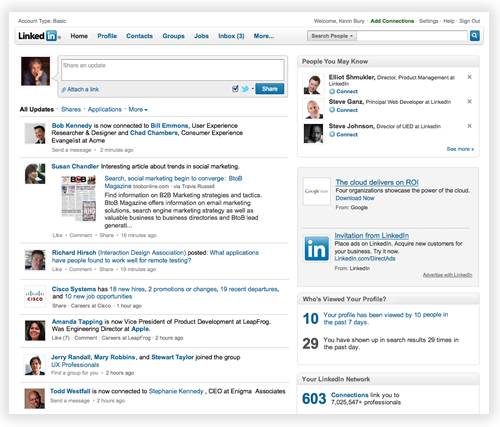
Some of you may have noticed a new site navigation experience on LinkedIn.  We are in the process of testing a new design.  During this testing phase, some users will see the new design, while others will not.

What’s New

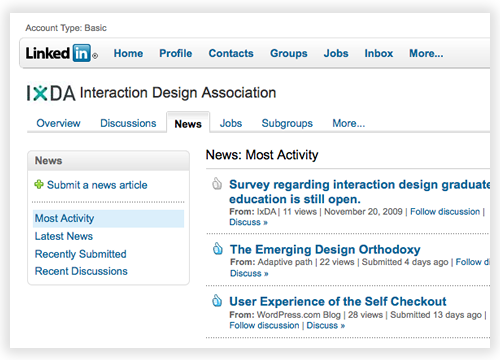
  1. A global navigation bar at the top of the page that provides convenient access to all LinkedIn services.
  2. Simplified local navigation within each of the LinkedIn areas (Profile, Contacts, Groups, etc.).
  3. More room available for page content. Less scrolling.
  4. A cleaner, less-cluttered look.

New LinkedIn navigation

An easier way to navigate and find information on LinkedIn

We began the redesign effort several months ago by analyzing how people use LinkedIn.  We looked at what features people use the most and pored over several years of data from usability research on the site. Armed with this information we began doing design explorations of how to better organize LinkedIn features, and make them more convenient to find and use.

We factored into this effort additional features we knew were coming. We narrowed down the designs to a few candidates we felt were strong contenders. We then prototyped these designs and had users perform tasks with the prototypes in the usability lab. We went through numerous iterations until we arrived at a design we felt worked the best.  One of the key features of the new design is that it allows much more space for page content – information about you and your professional network.

image2

We are now doing limited testing of the new design. We are still iterating and would love to hear your feedback!  Please consider this blog post one of the many ways to let us know what you think.

Feel free to either leave a comment at the bottom of the page or @linkedin us on twitter as well.

Tags: , , ,

Share: Email | LinkedIn | Digg | Twitter

trackback

http://blog.linkedin.com/2009/11/06/kevin-bury-a-new-design-for-linkedin/trackback/

comments

  1. [...] more here:  A new design for LinkedIn Categories : [...]

  2. [...] blog ufficiale di LinkedIn, direttamente dalla voce di Kevin Bury (Principal User Experience Designer [...]

  3. Hi, the new design looks great from the thumbnails. Would love to be included in the beta test!

  4. I would LOVE to be in the test group. I train people on LinkedIn daily and would be very interested in understanding the new design first hand. Possible?

  5. Since I am one of those not seeing the new navigation I can’t be sure how you have merged the personal navigation with navigation of services. That will be a key trade off with your more real estate goal for content. I don’t have data but as I think I use both navigation bars equally.
    Good luck and continue the good work.

  6. Ahh, that looks great. Profiles were getting a little crowded…

  7. [...] began the redesign effort several months ago by analyzing how people use LinkedIn," says LinkedIn's Kevin Bury. "We looked at what features people use the most and pored over [...]

  8. Hi Kevin and LinkedIn Team,

    Very cool!

    I like the new design. Glad to see you are creating the additional viewing space above the fold. It appears that by moving to a cleaner menu at the top of the page LinkedIn will pick-up about 10-15% more viewing space. This would also make a great layout for M.LinkedIn.com.

    Keep up the good work – Look forward to testing/using the new layout
    Best regards,
    TimBaileyGR

  9. Will this also include changes to company pages on LinkedIn? Maybe that is something you are looking to do in another phase?

  10. Looking forward to seeing the new look. While I prefer the logic behind the vertical list of options, I definitely think the horizontal tool bar is the better design – and more inline with other sites and designs.

  11. [...] announced today on their blog that they are in the process of testing a new design. Apparently, only some selected users will be [...]

  12. Pretty it up all you want but do not remove the left hand navigation bar or at least give us an option for horizontal or vertical formatting. I am a member of a number of groups and manager of a couple and having the groups in the lefthand bar all the time makes my life easier. Having to go to a drop down menu that I am likely going to have to scroll down on, too, makes it more difficult. Thanks for trying to improve the experience but make sure it’s an improvement for all of us. Thanks.

  13. [...] and beneficial service that enables people to network with others efficiently. Today came the announcement by Principal User Experience Designer, Kevin Bury that LinkedIn is currently in the process of [...]

  14. I like the new layout! I still need to get used to it. But I would like to see my number of connections on the Home screen like before.

  15. The new redesign really looks great. The biggest thing for me that hurt the user experience, IMO, were the multiple navigations. Half the time I wanted to click up top, but then had to click through twice just to get to a certain link on the left. So, definitely a welcomed change.

    Looking forward to seeing this new design roll out soon.

  16. LinkedIn has always been very easy to navigate, but the new design looks even better. Opt me in!

  17. I am one of those who is seeing the test format – I do not like it at all. The prior format, I believe, was much easier to read. This new format distorts the right hand side of page – runs off. When I go to my profile – there is no where to link to my public profile

    Please bring back to the prior format!!!

  18. [...] a detailed blog post, the company announced that it has begun a limited test of its new design. It features a newer, [...]

  19. Really nice looking. I’m looking forward to being in the In crowd when it rolls out!

  20. The snapshots of the new design look good, and I’m all for less scrolling.

    How about making some changes to the Questions? I’ve noticed that several people don’t select best answers, so it seems there’s a pretty big resource of peer-selected experts that’s unidentified.

  21. Looks awesome! Please put me on the beta list!!

  22. [...] | Readwriteweb Más información | LinkedIn blog En Genbeta | LinkedIn también habla en [...]

  23. [...] | Readwriteweb Más información | LinkedIn blog En Genbeta | LinkedIn también habla en [...]

  24. [...] company announced a limited test of the redesign in a detailed post on their blog. The new design features a longer navigation bar, removal of the left side navigation and a [...]

  25. Looking forward to the new design. More control over what the user sees is a definitely improvement. Thanks!

  26. I think you’re on the right track with this. Based on the screen shots the only feedback I would give is that there is (still) very little separation between page content and the top navigation. LinkedIn has always suffered from key navigation items getting lost in the mix. One of the most common pieces of feedback I hear when training existing users on the tool is ‘I never noticed that was there’ (referring to a piece of navigation – example is reference search). On a side note, the new features that have been popping up over the last few weeks are greatly appreciated. Good work.

  27. [...] to a post from the LinkedIn blog, the new design is being tested to some users. So some of us  might see the new design, while [...]

  28. [...] A new design for LinkedIn, The LinkedIn Blog [...]

  29. Got/getting better and better! Very cool!
    Sending message/invite sometimes confuses me ;)

  30. [...] So, you’re just getting used to Facebook’s newest redesign. And now the news that LinkedIn is changing their design as [...]

  31. This is great to hear.

    What I’m really hoping will improve is the initial page load time. It’s flat dreadful right now. Also, please keep iPhones and Nokia N900s (et al) in mind when you redesign. I’m accessing LinkedIn more and more from my pre-release N900… and right now the experience is a bit painful.

  32. [...] Go to http://www.buzzd.com/friend/invite ON YOUR COMPUTER and log in with your buzzd [...]

  33. [...] a detailed blog post, the company announced that it has begun a limited test of its new design. It features a newer, [...]

  34. [...] have noticed a change to the navigation and user interface of the LinkedIn.com website, announces a company blog post. The business-focused social network is in the process of rolling out an updated design that aims [...]

  35. This is a cool new design, thanx LinkedIn team.. :D

  36. [...] Información: LinkedIn blog Categories: Redes Sociales Tags: Diseño, LinkedIn, Redes Sociales Entradas RelacionadasLas [...]

  37. [...] There are four new changes in this newly redesigned home page: [...]

  38. [...] began the redesign effort several months ago by analyzing how people use LinkedIn,” says LinkedIn’s Kevin Bury. “We looked at what features people use the most and pored over [...]

  39. As a web developer I often find it interesting when I “experience” a redesign as a user and not the developer. It gives me a first hand experience on what happens when a website I am already sued to using, (good or bad) decides to change its design. My opinion is that as a developer I believe users will love the new upgrades, because I designed it so well!

    But the user in me says, I hate when a site gets redesigned. no matter how it looks, being that if I get used to features and navigations have been moved or changed I get frustrated, because its a change and people ahem I will speak for myself, I hate change.

    I use the status update a lot in linked it in that was one of the first things that I noted was different. In the end as soon as I learn how things have changed I can begin to accept and enjoy the new look and feel.

    Thanks and Regards

    Noel for Nopun.com
    a graphic design studio

  40. [...] a detailed blog post, the company announced that it has begun a limited test of its new design. It features a newer, [...]

  41. I have been offering training in using Linkedin since 2006 and I am very excited about the enhancements of group for that let’s 50 million + people have more personal discussions that are uniquely relevant to them.

    Martin Brossman

  42. [...] have noticed a change to the navigation and user interface of the LinkedIn.com website, announces a company blog post. The business-focused social network is in the process of rolling out an updated design that aims [...]

  43. [...] get new design Share The business to business social network LinkedIn has announced on it’s blog plans to upgrade its users navigation experience with a brand new [...]

  44. [...] the complete article posted by the Principal User Experience Designer at LinkedIn Kevin [...]

  45. These changes look like a great start to get things moving and make LinkedIn more user friendly. Can’t wait to test drive them myself.

  46. [...] business to business social network LinkedIn has announced on it’s blog plans to upgrade its users navigation experience with a brand new [...]

  47. [...] began the redesign effort several months ago by analyzing how people use LinkedIn,” says LinkedIn’s Kevin Bury. “We looked at what features people use the most and pored over [...]

  48. Just going by the screenshots, I think the new design is definitely a step in the right direction.

  49. [...] experimentando con un nuevo diseño. Por el momento sólo algunos usuarios pueden verlo, aunque el blog de la compañía ha declarado que se trata de mejoras [...]

  50. [...] Read [...]

  51. Let’s talk about streamlining that sent mail box. Suggest allowing people to delete the list of people we sent contact requests to – I just want to know the ones that have not yet accepted. Don’t what to go through a bunch of pages showing people who accepted the request.

    Also, would like the ability to delete outstanding requests sent – so basically make it like any other in-box in a regular e-mail program where you can delete messages.

    Also – permanently deleting messages as opposed to archiving would be nice – then could just archive the important messages and get rid of the junk – again better management of information.

  52. Looking forward to seeing the new layout- please add me to the opt-in list if you are currently doing that- happy to be a beta tester for feedback and insight..

  53. As a member of the “Friends of Linked In” group am surprised we were not automatically added to the beta so: please add me – thanks!

  54. The new page is missing lots of information. There is no left bar so no access to my inbox, groups, etc.

    Must be some kind of bug. Please fix or get me off this test ASAP.

  55. Hey Kevin,

    The screen shots look very promising. Unfortunately, I’m not in the test group. I hope it’s testing well, as it looks like a good improvement.

    Stan

  56. I’d love to have a look at the beta version, a welcome revamp :)

  57. [...] Anyway, back to LinkedIn. As I’m writing this blog post, I’m researching the new design. I don’t really know what the old design looked like, so it’s hard to comment. But what I do know is that a redesign will be advantageous for LinkedIn and their consumers. For information about the new design, check out the LinkedIn blog at http://blog.linkedin.com/2009/11/06/kevin-bury-a-new-design-for-linkedin/. [...]

  58. Hello
    This new design is very nice with its simple look.I like it very much.Thank you very much for giving this new design to us.Keep up the good work.

  59. That looks excellent!
    How does one go about becoming part of your testing group?

    regards,
    Jakob

  60. Hi there,

    The new design looks great from the thumbnails. I would like to be included in the beta test.

    Regards,
    - Ahmet

  61. Fantastic.. looking forward for the new design

  62. [...] quanto spiegato sul blog ufficiale del gruppo, il cambiamento dell'interfaccia è una necessità che è andata [...]

  63. @George – Since you are now seeing the new site design the left bar info can be found in the navigation across the top. Hovering your mouse over Inbox and Groups across the top will reveal what you are looking for. If not, please contact Customer Service and they can report it and look into this further. Dirk

  64. I like the new design. However, I would like to see my total number of connections on the home page again.

  65. I liked the new design a lot. With the tabbed navigation, its a lot more easier. However there is one thing that I personally would like to have. In the Groups tab it would be nice if the user can decide the three groups of his /her choice to be displayed in the Menu instead of displaying three groups using inbuilt logic. This would help the user to navigate quickly to the group that is followed with much higher interest.

  66. The new design means I have to scroll more! I don’t see everything on my screen from left to right. Is this a screen resolution issue?

  67. [...] el blog de la compañía aseguran que han realizado el rediseño basándose en la experiencia de usuario de quienes utilizan [...]

  68. LinkedIn update Q4-2009…

    Het is ruim een jaar geleden dat er significant nieuwe functionaliteit is toegevoegd aan het LinkedIn platform. Op 28 oktober 2008 waren dat de 9 LinkedIn Applications; Amazon, Box.net, Google, Huddle, Six Apart, SlideShare, Tripit, WordPress en Compan…

  69. [...] have noticed a change to the navigation and user interface of the LinkedIn.com website, announces a company blog post. The business-focused social network is in the process of rolling out an updated design that aims [...]

  70. [...] a detailed blog post, the company announced that it has begun a limited test of its new design. It features a newer, [...]

  71. I like the look/feel of your new design based on what you’ve described. However, any chance that you may be able to integrate the new “Folders” as one of the quick touch drop downs as well. (Hey – gotta keep your paying customers happy too!!)

    Thanks-
    Paul

  72. My news module has disappeared and cant get it back. Everything else looks ok and i am still testing it.

    Thanks
    Muhammad

  73. I really do like the new look and feel. More room, not as cluttered, and quite easy to move around in. I’d like to see the number of connections appear someplace though. Nice work, Kevin!

  74. I was surprised when my Linkedin home page changed about 10 days ago. I agree it is cleaner and makes room for more content, but some things about the new design I don’t like.

    On my home screen I feel there needs to be something along the left side. I did prefer the menu there, but also aesthetically it looks like something is missing, like the screen was cut off. I don’t mind the design change as much in the profile and groups pages.

    thanks
    Heather

  75. Hi, interesting new navigation structure. Would be even more interesting to see what is behind all those other menu items. Does anyone know?

    Thanks!
    Rainer

post a comment

This is a moderated site and comments will appear if and when they are approved. We will review the queue several times daily, so please don't resubmit if your comment doesn't appear immediately.

Close
E-mail It
Powered by ShareThis