You want Tweets? There’s an App for that…

As you’ve likely heard by now, we launched our first Twitter integration features at LinkedIn earlier this week.  For professionals who want to make Twitter part of their professional identity, you can now easily add your Twitter account to your LinkedIn profile, and seamlessly post LinkedIn status updates to Twitter, and vice-versa.

This launch also brings with it a brand new addition to the LinkedIn application platform: Tweets.

Tweets is an application that allows you to seamless integrate basic Twitter functionality into your LinkedIn experience.  For our users who are regular users of Twitter, Tweets provides the following:

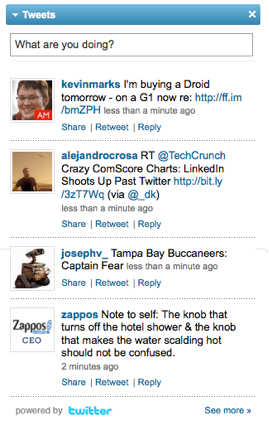
  • Twitter client functionality, right from your LinkedIn homepage. Tweets adds a module to your homepage that allows you to easily see the most recent tweets of the people you follow on Twitter.  You can also easily reply to each tweet, or retweet it. Better still, you can even share it with your LinkedIn connections.

LinkedIn Tweets from LinkedIn Profile (LinkedIn Tweets App)

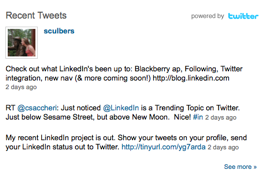
  • Add your recent tweets to your LinkedIn profile. Tweets adds a module to your profile that shows your Twitter account and most recent tweets with a rich, compelling presentation.  You can easily choose to either display your most recent tweets, or only those tweets which feature the #in or #li hashtags.

LinkedIn Tweets - People You Follow

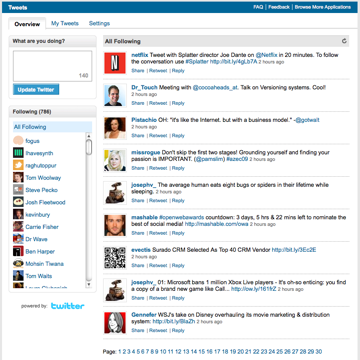
  • Easily browse the tweets of people you follow. Once you click through into the Tweets application, you can easily click on any Twitter user name, and view the most recent tweets of that user.

LinkedIn Tweets Homepage

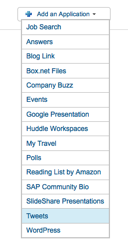
Next week, we’ll be adding Tweets to the Application directory on LinkedIn.  For the time being, if you’re interested in giving Tweets a try, here is the link to the Tweets installation page.  It’s also available from the “Add Application” menu on the homepage.

Tweets app in the drop down box

Tweets joins its sibling application, Company Buzz, the most popular application to date on the LinkedIn platform.  Company Buzz makes it simple for professionals to easily keep track of what people are saying about their company, products, competitors, and partners in real time by monitoring saved Twitter searches.  Together, they are a powerful set of tools for professionals to make monitoring Twitter a part of their LinkedIn routine.

Over the next few weeks, we’ll be adding additional functionality to Tweets to make it as easy as possible for LinkedIn members to find and follow people on Twitter.  We hope you enjoy this new addition to the LinkedIn application platform.

Tags: , , , ,

Share: Email | LinkedIn | Digg | Twitter

trackback

http://blog.linkedin.com/2009/11/13/linkedin-tweets-app/trackback/

comments

  1. Very usefull. Great job!

  2. [...] the rest here:  You want Tweets? There’s an App for that… Categories : [...]

  3. The Twitter and Linkedin integration is the best thing to happen in social networking for the business community.

    Keep up the great work!

    Michael T. Bishop
    Sperry Van Ness / StorageLand

  4. Its intresting feature, I hope you decide to give the possibility to clean the hash-tags out of the tweets and/or more options (like leaving replies out). This would provide a cleaner integration and more to my liking.

  5. Good app! Step by step LinkedIn is getting more social. Are you also working on integration of other social networks? Facebook?

  6. [...] Tweets application on LinkedIn is just being rolled out now. Read more about how it works on the LinkedIn Blog. I expect there to be some good value for businesses, especially small businesses now that [...]

  7. [...] on this integration, LinkedIn is also rolling out a Tweets application that adds additional Twitter functionality, allowing you to keep track of your Twitter followers on [...]

  8. Very good application. Also we not even want to open every social networking websites in diff tabs. Now, Atleast we can tweet from Linkedin.

  9. This is certainly a good integration in that one doesn’t have to update status messages in LinkedIn separately. However, my concern is that we will now be flooded by messages that tell us x is sitting in an airport or y is eating breakfast. LinkedIn has distinguished itself as a professional community and it would be great if you can continue to main that distinction from other social networking sites.

  10. @Shanti,

    As you know, we’ve incorporated the ability to re-route to LinkedIn only tweets that end with #in as opposed to streaming all your tweets back to LinkedIn. This should help you control the tweets that you actually would like to see on LinkedIn. Hope this helps.

  11. I share the concern Shanti is talking about. And not every one is using the #in or #li option so i’m indeed flooded with messages i don’t want to see.
    But can’t unfollow their updates on linkedin. I wasn’t following them on twitter for good reasons…..
    Why can’t i decide who’s updates i want to see?

post a comment

This is a moderated site and comments will appear if and when they are approved. We will review the queue several times daily, so please don't resubmit if your comment doesn't appear immediately.

Close
E-mail It
Powered by ShareThis