Home > Full Story

Most of us turn to blogs, newspapers, magazines, trade publications, and more when we’re looking for the info we need.  But just as often, we count on our colleagues and peers to point out the stuff we should read.

That’s why we’ve just made some incremental changes to how sharing works on LinkedIn. Here’s a video about how it works and a longer list of features and functionality around this new feature that you can start using today.

What’s new:

1. Public vs. private: You get complete control over who sees what you’re sharing, whether it’s everyone, your connections, a group, or a specific individual.
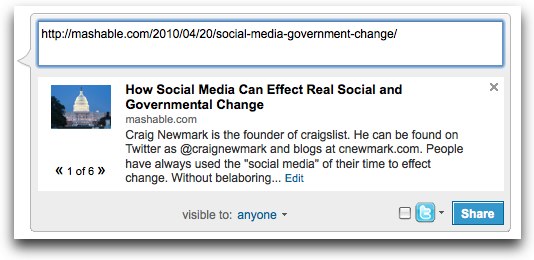
2. Images and article excerpt: The chances of someone clicking through your shared article are greater when you’ve images and brief excerpts pulled from the news article or blog post. What you share looks great, and you can customize it completely.

3. See and delete your own posts: We’ve all dropped a typo into a status message. Now you can quickly preview, edit, and delete before your connections see your creative spelling.
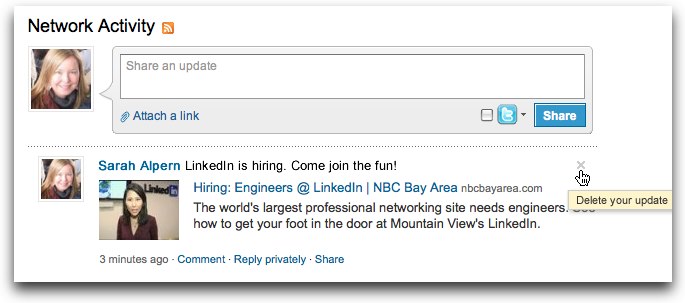
4. Easily re-share: Like what you’re reading and want to re-share it? That’s only a click away.  And share it with your connections, your groups, or individuals – or all at the same time.
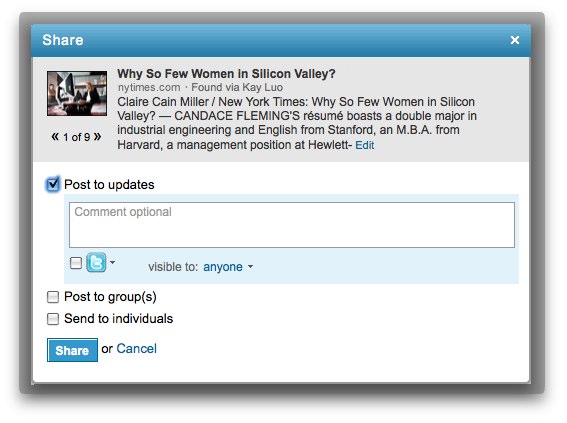
5. An improved off-site sharing experience: Try sharing to LinkedIn next time you’re visiting popular news sites like the New York Times, for e.g. You’ll find that you’ll go through a similar sharing experience I just described above.

6. A new, short lnkd.in URL: A new companion to our Twitter Integration (that we announced towards the end of last year).

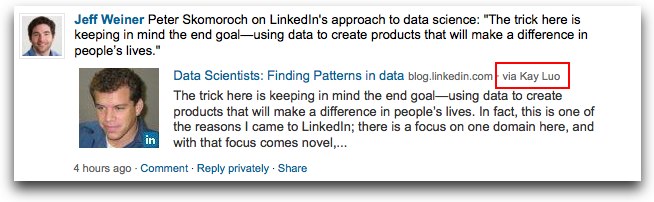
7. Attribution: The re-shared article will give credit where credit is due by attributing something you re-share to the person who shared it with you.
8.  Shared items on your profile: By choosing to make selected shared items public, you help profile viewers learn about your professional interests and expertise. Share often to keep your profile fresh and relevant.

We hope these features will make it easier for you to share and consume news as well as helping your connections find the info they need.

Want to try it now? Go ahead and share this very blog post!

And, please continue sending us your feedback either in the comments section below or @linkedin us on Twitter.

Trackback: http://blog.linkedin.com/2010/04/21/linkedin-sharing-news/trackback/
Add New Comment

Comments

  • Alexandr April 21st, 2010

    Why have both ‘text field’ and ‘attach a link’?

    Seems like one just has to come up with headers for each link they want to share…

     
  • Michael Grant April 21st, 2010

    How about a bookmarklet?

     
  • Katie Felten April 21st, 2010

    This is awesome..I noticed it last night when I was on LinkedIn answering some emails…I am very excited for these new changes and will be sharing them with my network..Keep up the good work.

     
  • Mark Lennox April 21st, 2010

    Love the new sharing – great that LinkedIN is catching up with the use of images too – far more engaging.

    Mark

     
  • Shekhar Sahu April 21st, 2010

    These are great improvements, especially lnkd.in.

     
  • Jennifer Bulman April 22nd, 2010

    At the risk of sounding slow and out of it – what exactly does lnkd.in do for me? I cannot use it to reference my LinkedIn profile, and it will confuse people who are used to seeing “www” in front of everything. About 60% of my clients did not grow up with the Internet, and computers are not their field of expertise.) Is this primarily for compulsive Twitterers?
    I have been very pleased with LinkedIn, to date. However,
    I am concerned that your new changes will make LinkedIn so much like Twitter and Facebook that I will have to Hide even more updates from the folks who surf the Internet and use Tweetdeck all day and cannot turn off the relentless, lame self-promotions. This was not the reason that I joined LinkedIn, and it is not the reason I give workshops on LinkedIn to business people.
    Please don’t wreck this wonderful application by trying to be all things to all people.

     
  • Jennifer Bulman April 22nd, 2010

    You say:
    “Now you can quickly preview, edit, and delete before your connections see your creative spelling.”
    I just entered a status and was not offered the chance to preview, edit or delete it. No buttons or choices appeared.
    Your video does not explain how to do it.
    What am I missing?
    Thank God I only get to annoy my connections instead of the world.
    Please advise,
    Jennifer

     
  • Peter Pressacco April 22nd, 2010

    @Nick Dellamaggiore: LinkedIn is now automatically replacing the URLs I post in my status messages with http://lnkd.in/XXXXX. Is there a way to stop this from happening?

     
  • Christine Hueber April 22nd, 2010

    Great list of what’s now available … thanks!

    Best,
    Christine Hueber

     
  • Jay Rossiter April 22nd, 2010

    Has this been added to the developers API, as well?

     
  • Michael Green April 22nd, 2010

    Great feature – however, I removed my old twitter account and am trying to add a new one with no success – keep on getting an error -”there was an error adding….”

    Any advice?
    @Michae1Green

     
  • Ari Herzog April 22nd, 2010

    Thanks for the changes, which I noticed earlier today. Only suggestion based on this is to enable *me* to hide specific updates based on filters similar to what Facebook allows, e.g. if I only want to see LI updates but not Twitter updates piped to LI.

     
  • Pat Hudd April 25th, 2010

    These are good enhancements, but I would like to see some better control on items / feeds in groups as a manager / owner.

    I have news feeds coming into my groups. Due to the keywords, some of the items aren’t relevant and I would like to delete them. It would be far better to have a checkbox apporach to allow deletion of multiple items. Also, if I go to latest news and delete something, it return me to the group overview page, rather than back to where I was in group-news-latest, this is quite frustrating.

    Thanks

    Pat

     
  • Mitchell McKenna April 26th, 2010

    I agree with Ari above,
    An option to ‘hide’ status updates automatically imported from twitter is much needed.

    Following profession related status updates from connections on LinkedIn was one of my favorite features on LinkedIn. Since integrated Twitter connections decided to auto import their tweets! The sheer amount of noise it’s created on LinkedIn makes it impossible to follow what your connections are working on.

     
  • Mitchell McKenna April 26th, 2010

    @Michael Grant
    I just discovered LinkedIn already has a bookmarklet, check it out here:
    http://linkedin.com/static?key=browser_bookmarklet

     
  • Michael Grant April 26th, 2010

    Cool, thanks for the link to the bookmarklet!

     
  • Laurel Bailey April 26th, 2010

    I like the link shortener, in theory. However, the counter I use can no longer recognize visits to my blog from this shortened URL. That’s a problem for me. :-(

     
  • Chris Moline, LEED AP April 26th, 2010

    I’m going to second Ari and Mitchell’s comments about an option to “hide” status updates automatically imported from Twitter.
    Linkedin is a valuable tool!

     
  • Lucas April 28th, 2010

    How do you choose which images to display? Do you predetermine that image could be seen in the first place?

     
  • Allison Levine April 28th, 2010

    Can I recommend that you add a “publications” section to profiles. I would like a way to feature articles/books I’ve written on my profile and I’m sure users in the education industry would really appreciate this.

     
  • Nick Dellamaggiore April 29th, 2010

    Thanks to all of you for your feedback. Please keep em coming. We’re working on making this feature even better and these comments are really valuable.

    @Michael Grant, Mitchell McKenna
    We do have an existing sharing bookmarklet that we’re working on making even better. If the current version is working for you, great! Otherwise, please check back in a couple weeks to re-install the new and improved bookmarklet!

    @Ari, @Mitchell and @Chris,
    We’re working on providing a filter so you can limit the noise coming in through your status updates. Stay tuned.

    @Jennifer,
    Regarding the preview, editing and deletion of posts, there are examples in the video (above). You’ll notice at the 38 second mark in the video, a subtle “X” appear when the mouse hovers over the newly shared item. Click that “X” to delete the post. Hope that helps!

    @Jay,
    We’re definitely working on exposing this functionality through our API layer.

    Once again, thanks! And, keep those comments coming.

     
  • شات May 5th, 2010

    Can I recommend that you add a “publications” section to profiles. I would like a way to feature articles/books I’ve written on my profile and I’m sure users in the education industry would really appreciate this.

     
  • Rickey May 8th, 2010

    Wow, I see Linkedin has made some recent changes. Up until now I wasn’t aware of these changes. It really makes sharing your blog posts easier and more convenient. Cool and thanks for the link to the bookmarklet!

     
  • Jahanzaib Dilawer June 2nd, 2010

    Hi. I am a very big fan of linkedIn. But there is only one thing that I have been missing since I joined linkedIn and that is Photo uploader for picture sharing many of the articles and news could be on .jpg format stored on a computer so I really want a Photo sharing option in LinkedIn. I have asked many people about it and they always says upload it on flickr share link on LinkedIn but why not only on LinkeIn plzzz introduce this feature you gonna need to add this in the near future. People realy liked to share pics on social networking sites. Thakyou!

     
  • Marie Gary July 9th, 2010

    How do you share a LinkedIn group on twitter? Is it possible? If not possible is it because you must be a member of the group to view information?

     
  • Paul Snell September 3rd, 2010

    As a publication, how do make sure the picture it selects in the excerpt is the correct one? Is there any way I can change this?

    Thanks,

     
  • Sad November 21st, 2010

    Sad that there isn’t a plugin/widget yet for commenting with your LinkedIn profile on external sites.

     
  • Jim February 15th, 2011

    Blogging is really great now a days because people wants to share their views over different topics and blog can provide a space to write for that…………..

     
  • Dan March 9th, 2011

    I posted our web site url but its not publishing a photo with the url. How do I get the update to include a photo? Where does this grab the photo from?

     
  • Hugh Macken April 26th, 2011

    How do I insert a News tab in my group so that news items from the RSS feed show up there?

     
  • JG August 10th, 2011

    When will we be able to create vanity urls for Groups, like Facebook? Thanks for any help or updates.

     
  • Evan A. Held September 26th, 2011

    Thanks for all of the upgrades, I’m sure that I may have used some and just didn’t know it. I live Linkedin, so keep-up the good work!

     
  • Harrie van der Lubbe October 6th, 2011

    There is a strange bug in this functionality: when i type in the url http://www.kirkmancompany.com (a site i am developing) in the text box, the generated description text is a really old text from this website, which does not exist anymore. However, when i type in the URL in the ‘share a link’ box, the correct descrtiption is displayed. So I get 2 different texts for the same link. Seems like a bug? Could you help me out?

     
  • Cat October 6th, 2011

    Hi,

    Has anyone got any idea why a page wouldn’t pull an image in when I attach a link?

    I know FB has the og:image that you can put as an attribute to specify which image is pulled in when the link is shared – does LinkedIn have something similar?

    Haven’t found anywhere else that mentions this problem so any advice would be welcome.

    Thanks,

    Cat

     
  • Cat October 6th, 2011

    Ignore the last post – just added to the top of the page and it’s picking that up as the post image now. :)


Add New Comment

This is a moderated site and comments will appear if and when they are approved. We will review the queue several times daily, so please don't resubmit if your comment doesn't appear immediately.