

Home > Full Story

If you’re a LinkedIn user, you already know the power of your professional network.

What if you could visualize what your network looks like?  Would your connections form clusters or groups?  Wouldn’t it be great if you could see the way all your connections are related to each other? Even be able to identify the elusive hubs between your professional worlds?

Now, you can! This week, we’re introducing a new LinkedIn Labs product, called InMaps. More after the jump.

InMaps is an interactive visual representation of your professional universe that answers all of the above questions.  It’s a great way to understand the relationships between you and your entire set of LinkedIn connections. With it you can better leverage your professional network to help pass along job opportunities, seek professional advice, gather insights, and more.

Here’s how it works: your map is color-coded to represent different affiliations or groups from your professional career, such as your previous employer, college classmates, or industries you’ve worked in. In my InMap, my LinkedIn colleagues are blue, while my former colleagues at Yahoo Analytics are pink and other at Yahoo are green and my Carnegie Mellon classmates are orange and tangerine.
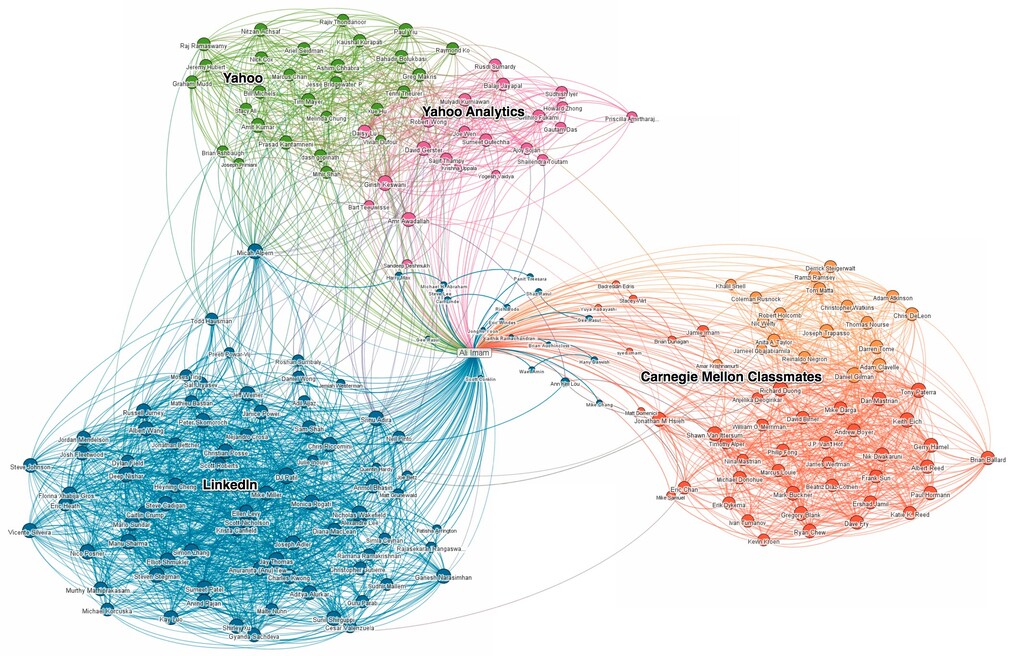
Bigger names represent people who are the most connected within that specific cluster or group. When you click on a contact within a circle you’ll see their profile pop up on the right, as well as lines highlighting how they’re connected to your connections.

Here’s where it gets interesting. Your map is actually a view into how your professional world has been created over time. To get a sense of how that’s true, label each cluster (color) and explore your connections to see who are the major bridges on your map. You can use those insights to measure your own impact or influence, or create opportunities for someone else. So, you might see two distinct groups that you could introduce to become one. Or, you might leverage one person to connect them to someone else. See an area that doesn’t look like it is representative of your professional world? Fix it by adding the necessary connections.

Just like snowflakes, no two networks are the same. Not convinced?  Share your InMap with friends and colleagues via Linkedin, Twitter, or Facebook (your contacts’ names will not be included).

We hope you take some time visually exploring your network.  I know that every time I look at mine I find something new!

To access your InMap, go to http://inmaps.linkedinlabs.com.

Ed. note: You must have 50 connections and 75 percent of your profile completed to access your InMap.

Trackback: http://blog.linkedin.com/2011/01/24/linkedin-inmaps/trackback/
Add New Comment

Comments

  • Luke Hutchison January 24th, 2011

    InMaps is great, but if there are “dangling” connections that are connected to nobody else in the graph (or maybe that are connected to one other dangling node), they get assigned to your first cluster. This is inaccurate. There should be a color for “Unknown”, maybe light gray, and if a node is not part of a tight cluster, it should be assigned to the Unknown group.

    Also, I tried reporting this by clicking on the “Submit feedback” link at the top of InMaps, but the email bounced with the following message: “Your message can’t be delivered because delivery to this address is restricted.”

     
  • Victoria Ipri January 24th, 2011

    Sounds like a great tool, but my “network is too large to compute.” When do you anticipate this will no longer be an issue? Your post simply says you must have at least 50 members.

    Thanks!

    Victoria

     
  • George January 24th, 2011

    This really could be a great insight tool. Providing readers such as myself a visual aspect of their connections gives them a detailed view of who’s who and where. Awesome.

     
  • Bruce N. Goren January 24th, 2011

    Oh wow man, the colors. Timothy Leary would have loved this.

     
  • Brent Ozar January 24th, 2011

    It’s cool, but it’s darned near unusable for those of us who are colorblind. On the left side, where you define labels for your network, it’d be nice if it highlighted the links when we clicked on a particular color – that way we could see who we’re labeling. Right now I can’t tell which one I’m labeling.

     
  • Patrick Dacre January 24th, 2011

    Is this live getting an apache server http error on my access attempt to log in with linked in account.

    hmmm..

    sure would be nice when/if this shows not only direct and indirect connections, but also group dynamics.

     
  • Phil O'Brien January 25th, 2011

    Thanks Ali. It’s a really useful tool – and your blog explanation is very helpful too. I have written a short post on my Personal Network blog – http://wp.me/pYnfH-78 Best wishes. Phil

     
  • Ravinder Kumar January 25th, 2011

    We at ‘Eagle Cargo Packers and Movers’ have a customer oriented approach towards the varied needs of our clients. Our company situated in Ludhiana, is built on the strong principles of safety, integrity and reliability. We offer to our clients cost effective and prompt moving & packaging services and goods…………

     
  • Egon Willighagen January 25th, 2011

    Nice! Will we be seeing the same thing for Groups?

     
  • Bruno Lowagie January 25th, 2011

    Am I the only one with such an ugly, messy Inmap? http://lowagie.com/inmap

     
  • Ian Kennedy January 25th, 2011

    I noticed that all my Silicon Valley connections are showing up on the left (West Coast?) and my colleagues from Dow Jones are showing up on the right. Dow Jones is headquartered on the East Coast.

    Coincidence or feature?

     
  • Dan Ness January 25th, 2011

    Appealing eye candy. It would be more useful with a better way to label for the many who are color blind.
    Maybe use some other visual cues?
    - A click on the legend might highlight its members?
    - A click on a member hightlights the corresponding legend?
    - Order the legend by # of members in that group?
    - Match shapes between the legend and members (now legend has squares and members are circles)
    - Maybe once a legend name has been applied, float that name near a cluster of those members?

     
  • Joris Claeys (knoledgEnabler) January 25th, 2011

    I picked up on this via Machable! and immediately checked out its potential and value. Great tool indeed – at least the intention – but as others reported already: when will it work for people with larger global networks.
    Once it can do this, it would become a great tool to identify one’s strengths and gaps. As outlined it would become THE tool to identify the next steps with your network or suggest connections to your network, which in turn will make your network stronger and more targeted.

    Guess we will have to be patient a little more & see how the next release can cope with it.
    Great job to the LI engineers, hope to see soon a way for us to start working with it as well. Thanks

    Joris Claeys
    “knowledgEnabler”
    ACCELERATE-gscs
    CAPSTONE Logix
    MARKETING VILLAGE

     
  • Ryan January 25th, 2011

    I’m sure this would be nice if I could get in. There’s currently some sort of error on the authorize screen. “An Error occurred during authorization, please try again later.” I know I have the right password because I can sign into my linkedin.com account.

     
  • Ryan January 25th, 2011

    Ah, following up – does not work with Firefox or Safari. Only IE, I guess. I bet you’re setting a session cookie over HTTP rather than HTTPS, er sumthin.

     
  • Dennis Hardjo January 25th, 2011

    Shouldn’t InMaps be part of the Applications (like e.g. Company Buzz) within the LinkedIn app itself, because now you have to login twice: in LI itself, and again in InMaps. That’s annoying.

    Besides, I don’t know for sure if InMaps is really from the LI makers, you never know for sure when it is spoofed.

    Dennis.

     
  • Ehab Elagaty January 25th, 2011

    Got the following message when I tried to view mine.

    “Wow! That’s one large network.
    It’s so big that we can’t do the computations right now. Stay tuned!”

    Looking forward to seeing how it works once it works with large contacts, I have about 17,750 contacts.

    Ehab Elagaty

     
  • David Steier January 25th, 2011

    A suggestion: showing how a person’s network grows and changes over time, as a function of moves and job changes, might make an interesting animation.

    –David

     
  • Oscar Castaneda January 25th, 2011

    Is there something like this but for companies? In other words, a visualization that connects companies instead of people (but based on people).

    Also, great tool, works fast and looks nice! Congrats!

    -oscar

     
  • Steven Pofcher January 25th, 2011

    While it looks snazzy with all the different colors, I cannot find a use for this.

     
  • Sudeep Sakalle January 25th, 2011

    My 1st reaction was Wow … but as i check it more and more, i think realtime semantic world is still far from reach. It would have been much better if i can click on connection link to highlight nodes.

    Good application though, I see a bright light for this app.

     
  • Marcello January 26th, 2011

    this is nicely conceived. It would be great if I could also search for my contacts.

     
  • Quena January 26th, 2011

    I can’t get beyond the “Give us a minute, we’re gathering your connections…” screen. I’ve clicked both the “I’ve got time, and I’ll wait” button (> a dozen times) and the “Email me when it’s ready” button (> 24 hours ago), in Firefox and Chrome. I have 200+ connections.

     
  • Phil O'Brien January 26th, 2011

    FEATURE REQUEST – please could we have a “Print to A0 Paper” service – so we can have our networks displayed as big as DJ Patil’s http://wp.me/pYnfH-7f

     
  • Chris Grant January 26th, 2011

    Whoa. Eye candy, big wow factor, but hold on a minute people. If you really don’t already know how your contacts are associated with each other, then you’re due for a little thinking time.

    People who are already highly interlinked to each other will be in one color cloud, and will not be linked particularly well to the people in a different color cloud. The things causing interlinks should be pretty obvious – your college friends, your friends from this job, your friends from that job, and so forth. Nothing spooky or Big Brother about it. And if you don’t have much of a color pattern, then your contacts are probably a pretty homogenous group and the algorithm is having trouble finding ways to split them. The omission of the isolated contacts (or, rather, lumping them in at random with another cloud) is a big flaw in the implementation.

    Check out any data viz site for many other past uses of this same kind of representation. This is a nice implementation but as I said, it doesn’t supply much by way of insight.

    Maybe everybody’s amazed reaction to this thing is my personal takeaway: People mistake coolness for value.

     
  • janeyquiel January 27th, 2011

    I agree with your assumption.

     
  • Sarah February 1st, 2011

    The map is not updated when new contacts are added, which makes the whole thing inaccurate…

     
  • aswecomment February 1st, 2011

    I looking for something to map a LinkedIn Group. Is that possible?

     
  • Mª Dolores Novillo February 3rd, 2011

    I agree with Chris Grant in his reasoning.
    What tipe of information can we extract of this graph?
    I would like to introduce priorities about my labels. And on this base to colour the nodes.

     
  • Josh February 3rd, 2011

    I first used the InMap application last week. Since then I’ve added a few more contacts and it seems that the application hasn’t updated my map. Is this something other people have seen as well, or have I done something wrong?

    It is interesting to see how many of my network contacts are in the same circles but aren’t connected for some reason or other.

     
  • Sharon Weshler February 4th, 2011

    Great stuff, it is a shame it cant deal yet with large networks such as mine, looking forward…from far away in Israel

     
  • anand February 5th, 2011

    I wish it would work to enjoy the results :-)
    First there appeared “Wow, you’ve got a complex network! This is going to take a bit longer than we expected.” I’ve 500+ connections.

    Later I got a notification the calcu;ation was ready. However, in my browser (Chrome, IE, FF)it won’t show the visualisation and you get stuck waiting and watching a blank map. :-(

     
  • Sarah February 6th, 2011

    Josh, I’ve had the same remark as well. How to update the map?

     
  • jolivacea February 9th, 2011

    I saw this question posted before, but no answer has been provided: is it possible to map groups?

    This would be extremely useful for conferences or online communities, where members could join the group and instantly see whether / how they are connected to other group members, without having to connect to them all!

    If anyone knows whether this is possible OR who could make this happen, please let me know.

     
  • Jeremy February 15th, 2011

    Doesn’t seem to update at all since the first time I have tried it. It’s not interactive.
    In the end not as fun as Touchgraph for facebook and certainly not more useful :(

     
  • Matteo Borsacchi February 15th, 2011

    am i the only one who can’t make it work?
    I got 75 connections and 75% complete profile.
    I’ve tried on firefox and chrome but it keeps loading without showing anything.

     
  • Graham Forward February 15th, 2011

    You should have view options. Display by company, job function, and location. People have data in LinkedIn and would like to know more.

     
  • Laneth Sffarlenn February 18th, 2011

    @Matteo Borsacchi – No, you’re not the only one.

    I’ve tried to load it in the latest builds of Firefox, Chrome, Safari, Internet Explorer and Opera on Windows Vista and XP, two different machines.

    Also tried loading it on my iPad – all got to the same loading screen and just sat there for ages without loading anything.

    The only thing I can interact with at all on the page is the video on the sidebar to the right of where the map will (I assume) display.

    I’m contacting LinkedIn by Twitter in the hope I get a reply – will let you know if I find something.

     
    • Derek Homann February 18th, 2011

      @Laneth- You’ll probably be better off contacting our CS team to troubleshoot. Feel free to send them all the details of your issue here: http://bit.ly/gwJBPD

      -Derek

       
  • Kip Gregory February 18th, 2011

    For several days now, I’ve been trying to generate a map but every time I log in (in either Firefox or Chrome, the suggested browsers), all I see is the spinning circle. It seems to spin indefinitely, never completing the process and displaying anything. Have about 1300 connections.

    Looks like I’m not the first to have a problem. Will you be resolving the issue anytime soon?

     
  • Thibaut Legendre February 21st, 2011

    There are a few items that I miss in this InMaps:

    1. Time perspective. I do not know how useful that would be, but if you have effective dating enabled in your connection engine, that surely enables your to “Play” the development of a network in time,

    2. This type of graph is actually a nice way to replace the network navigation UI. For example, type the name of a person you want to connect to, and see on InMaps what is the road through your own contacts, you can reach that person.

    3. There should be a way to see groups as a map, and drill in the content of groups.

    4. I often browse my network to thinking “Who could I contact for this or that”. The InMap is helping greatly to find the answer, because the answer is sometimes not about the person itself, but about what he or she is likely to know, and that is also equal to whom he or she knows… So I would need when hovering on a person to see names of his/her contacts also appearing, maybe in faded – transparent colours…

    5. My compliments for this beautiful and ahead of the curve feature!

     
  • Stephane Vellay February 21st, 2011

    Beautiful indeed and already some interesting insight on my colleagues and customers. What is the clustering algorithm behind?

    I have a few feature requests (some inspired from above)
    - I agree with Luke Hutchison about grouping simgle member clusters in a specific cluster: a singletons cluster.
    - Would be great to be able to modify the clustering method parameters. E.g. number of clusters, the average number of members by cluster, a threshold above which you don’t cluster with the other members (based on distance or number of connections), etc.
    - Would be excellent to do the same but using companies instead of names: how well companies are connected? Companies and universities, competitors, partners, etc. All the data you have at Linkedin must be extremely informative
    - Indeed make this work for color blind: let us change the colors and/or select a range of shapes

    Thanks and keep up the good work!

     
  • Brett Flickinger February 24th, 2011

    I love this thing but want to use it to show others my “visual connections” without pushing it to my contacts by sharing it. Is there a way to place this on my profile page in LinkedIn so my contacts can see it as they visit my profile? Also I can see no natural links to how the contacts were assigned color groups. You allow me to set up natural labels but I cannot change a contacts color/group so the picture is inaccurate and relatively less useful. Do you plan to allow this any time soon?

     
  • Ian Craig February 28th, 2011

    This is fun, and it actually got me to start exploring Gephi. If I want to explore my connection map further, is there a way to easily access the raw data for importing into Gephi?

     
  • Matteo Borsacchi March 2nd, 2011

    It works now.
    I haven’t changed anything, so i guess the problem was that i added most of my connection the same day i tried the application (i used mail contacts auto invitation).
    Maybe i should have waited for my data to be updated.
    It took about a week.

     
  • Eric Melse March 4th, 2011

    I really like this visualization tool.
    But, once it has been created and placed on my LinkedIn page, it becomes static! It is not possible to zoom or pan the map, to see the names of the nodes. It is rather disappointing to see only my name in the center of the network. So, why is the dynamic map not available to the visitor of the LinkedIn page, and, when can we expect it?

     
  • Mark Mansour March 8th, 2011

    Damn… my network is too big!!! :-(

     
  • joão carlos March 9th, 2011

    A great app, but I feel the lack of support for preferences and weighing the nodes. There a lot of nodes that get loose and it would be great to have some sort of post-edition.

     
  • timothyweissbrot April 13th, 2011

    This is 100% correct !

    smolkowicz
    GlobalHardware

     
  • Hitesh Gondalia April 15th, 2011

    I like It !

     
  • Tom H. C. Anderson May 15th, 2011

    Sucks! Still doesn’t work with accounts with larger networks. If you only had a few connections there wouldn’t be much use to visualize them would there!??

     
  • Remus Zelina May 24th, 2011

    The idea of showing information/data by using other things than grids (in our case “meaningful” visual representation of GRAPHS) is a step forward for data visualization. But also depending on the “eye” looking at it. I think InMaps is great. More or less the same as: http://apps.facebook.com/challenger_meurs

    I’m curious if you’ll post this, but on the other hand I’m happy to see that other people have same thoughts as we do.
    BTW we would have first implement our app on LinkedIN, but your API doesn’t return the connections between “my” friends.

     
  • Peter Hines May 25th, 2011

    With a large network 25K+ this feature does not work…when will it work for large network users?

     
  • Evan June 20th, 2011

    Haha..my networks too large..I’m too large a beast!

     
  • RS Taichi July 2nd, 2011

    Very interesting, now i just need to get more connections.

     
  • Keith Kendall July 28th, 2011

    It is interesting to see visually where I am tightly connected, and where I have fewer connections. But then, in the back of my mind I already knew where I had lots of connections, and where I don’t have many. I like it.

     
  • allegroviva August 2nd, 2011

    How many nodes and edges can view? No limit?

     
  • Robert August 6th, 2011

    Mine started out all colorful spread apart and pretty…. now it’s almost 99% One Solid BLOB… some of my new connections look like they are massaging the blob so we will see as time progresses.

    Iy would be beneficial to see 2 3 and Group Relations. And I’d love it if you could rotate the map and peer into it.

    When Mine was only 130 connections I could distinguish everyone apart from each other but NOW with over 1000 connections, and being so compact — I can not see thedepth to it because it’s almost a complete solid oval egg shaped map… It would be very beneficial if you can also see your direct connections second levels beyond who they are networking among your connection first degrees.

     
  • dan August 17th, 2011

    Is the code for this visualization available? I think this would be useful for others as well!

     
  • cindyxiaoxiaoli September 3rd, 2011

    Why doesn’t it tag the clusters automatically? LinkedIn does have all the meta data that they need, right? A suggestion would be nice. That would be truly powerful.


Add New Comment

This is a moderated site and comments will appear if and when they are approved. We will review the queue several times daily, so please don't resubmit if your comment doesn't appear immediately.