

Home > Full Story

A few weeks ago we announced we were doing limited testing of a new navigation design for LinkedIn. Thanks to all of you who have sent us feedback. We are now in the process of rolling out the new design to all of our users. If you don’t see the change yet, you will sometime in the next week.

The first thing you’ll notice in the new design is that there is no persistent left-hand navigation. All global navigation is in the top navigation bar. We did this in order to free up space for page content – information about you and your professional network.

Another thing you’ll notice is that the new global navigation bar takes up less vertical space. Page content is moved up higher on the page – less scrolling!
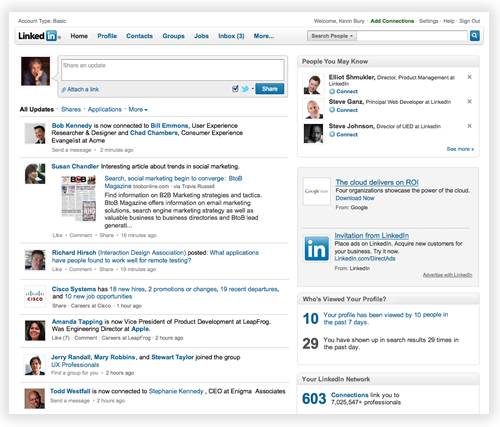
The global navigation bar

The global navigation bar is always available and provides convenient access to all LinkedIn services. Pass your mouse over the bar and you will see menus that provide quick access to the most popular LinkedIn features. For example, the Groups menu has links for finding and creating groups; it also has quick links for the groups you access the most often.
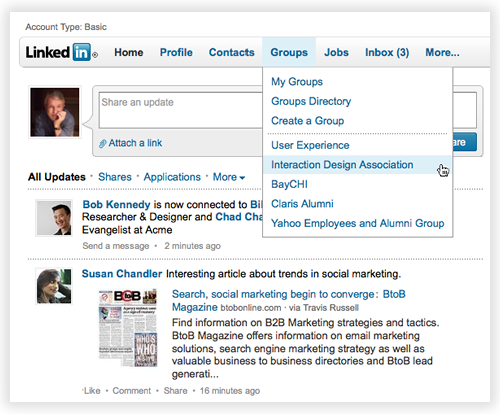
Additional applications and services are available under the More menu.

Local Navigation

When you are in an area of LinkedIn  (such as Contacts or Groups) you see local navigation. The major sub areas are in tabs along the top of the page. If the page allows filtering of content (such as Discussions or Search Results) these options are shown on the left.
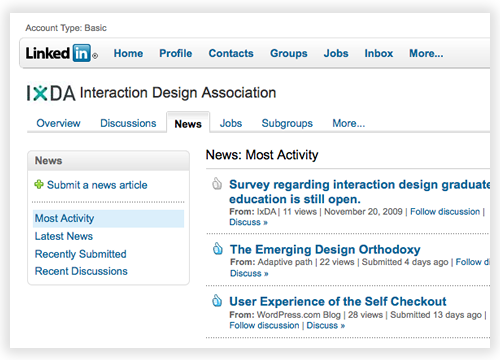
On some pages, the new navigation can increase the amount of space available for page content by almost a third. In the coming weeks and months, look for continually improved and relevant content to occupy this space. Stay tuned!

Trackback: http://blog.linkedin.com/2009/12/09/a-new-way-to-navigate-linkedin/trackback/
Add New Comment

Comments

  • Ari Herzog December 9th, 2009

    Should I presume the inclusion of traditional features like “Answers” under the More tab are indicative LinkedIn is placing less emphasis on it?

     
  • Mark December 9th, 2009

    Great new design, how do I sign up to get the new layout active?

     
  • Chad Romig December 9th, 2009

    Looking fwd to it!

     
  • Dimcho December 10th, 2009

    Kevin,

    The new design is a total fail for the following reasons:

    1) When you log in and see your home page, your entire screen is occupied by the Build your network box that you don’t use on a regular basis anyway. You no longer see your new messages or updates, you need to scroll down for that.

    2) Deleting the left-hand navigation pane is a bad idea. It used to show your messages (sent and received) and groups used most often. It provided info *at a glnce* of your new messages and also access *at a single click* to these features from any page in this site. Now you need to *do more actions* to go to the group you manage or check your inbox. Noone likes extra work.

    3) Stretching the main pane to the sides makes it difficult to read as lines are inconveniently long.

    Bottomline: dissatisfied user

     
  • Phil Szomszor December 10th, 2009

    Like the design and layout changes.

    What do you make of Facebook’s privacy changes today though? Will LinkedIn follow suit?

    Thanks
    Phil

     
  • Khürt Williams December 10th, 2009

    I did not like the side navigation.

     
  • Richard Oppenheimer December 10th, 2009

    Global navigation in the top bar is much less efficient than the persistent navigation that was present on the left hand side. I have always used navigation significantly in my use of the site and the change slows down my ability to browse the site. The slowness of the drop down mechanism on top is not outweighed by the reduction in scrolling which is hardly noticeable; I still will be doing a lot of scrolling. I have always appreciated change and improvement, but this one is a step backwards.

     
  • Jeffrey L. Taylor December 10th, 2009

    Like it? I love it! Much more functional. Allows for more content and better organization. It is aesthetically more pleasing too. It is a cleaner appearance and simply more professional.

    Thanks for this improvement – and please keep improving this terrific resource. JT

     
  • Ricardo Amores December 10th, 2009

    Sorry for this terrible offtopic, but I’ve got a problem with my LinkedIn account and the customer service doesn’t seem to answer me.
    I’ve tried to login in my LinkedIn account just to found out that it has been deleted. Not suspended but deleted without a trace, which was confirmed by some of my contacts that also have a linked in account: my name didn’t even shows up in his contact list.

    I have NOT received any warning or notification mail.
    Please, I would like to know what can I do to revert this situation as fast as I can.

    Again, sorry for the offtopic.

    Best regards

     
    • Mario Sundar December 10th, 2009

      @Ricardo,

      Looks like our CS team caught your tweet on this topic. I believe your problem will be resolved shortly. Or it may have already been resolved :) Thanks!

      Mario from LinkedIn

       
  • Will Jeansonne December 10th, 2009

    Kevin,

    I really like the new changes!It’s very clean and does indeed allow you to view more of a page without scrolling, so it’s a definite improvement in usability.

    Keep up the great work!

    Will Jeansonne

     
  • Donna Serdula December 10th, 2009

    I can’t wait for the changes to hit my profile!

    –Donna

     
  • Stewart McCoy December 10th, 2009

    1) I was immediately struck by the breathing room. Pages no longer feel as cluttered and claustrophobic. The white space is very welcome.

    2) I don’t believe LinkedIn “broke” the navigation. It’s very conventional and only took me 30 seconds to figure out “new routes” to my routinely visited information.

    3) I’m disappointed the “build your network” box is still glaring at me on my “home” page. As an established user, I rely primarily on the “People you may know” box to update me on possible new connections. Otherwise, I use the search box.

    I feel that most users, like myself, will only use the “build your network” box once to import contacts from e-mail, and then the box will be ignored.

     
  • keith stokes December 12th, 2009

    IIIIIIIIIIIIIIIIIII like it!

     
  • Barb Giamanco December 13th, 2009

    When will the changes hit for all users? I am conducting an Advanced LinkedIn training for a corporate client on Tuesday, 12/15. I’d like to be training them on the new layout:)

     
  • Simon Stark December 17th, 2009

    I still can’t see the update :(

     
    • Dirk Frey January 5th, 2010

      @ Simon- You should be able to now. I hope you like it.

       
  • Tyler December 20th, 2009

    While everyone I work with has the updated style/functionality, I am still in the older settings/style. Could this be due to me having a Pro Account?

    Either way, please let me know if there already is a set date when accounts like my own will be rolled over to the new style. I just feel a little odd not having the new functionality while also being the only person with a “paid” account.

    Any insight would be wonderful.

    Thanks,

    Tyler

     
    • Dirk Frey January 5th, 2010

      @Tyler and others- New Navigation should now be rolled out to everyone.

       
  • Chuck December 31st, 2009

    While I appreciate the effort to improve the the site, I find the new change not as user-friendly. Opening up my Home page and seeing pages of contacts’ and their information ( I know I can change how much I see) is of no value to me. I like the old version better as it contains the information and links I want to know about at a glance right there.
    Perhaps my understanding of how to use the new layout is lacking?

     
  • Gareth James January 2nd, 2010

    This Nav works pretty well.

     
  • Bryan Hunter January 6th, 2010

    I all for change and I generally think the new redesign is for the better – however – it seems to have buried one of the most valuable tools to me: the Connection Updates.

    One of the best ways for me in the past to find new Connections was to keep an eye on who my current Connections were connected to. Now I primarily only see twitter/status updates and profile updates – which frankly is less important to me.

    Is there a way to customize my view on the Home page to prioritize Connection Updates?

    Also, I notice this same trend on the iPhone app – I can’t see any Connection Updates (new connections of my connections).

    Thanks and keep up the good work – please take my feedback as constructive feedback from a appreciative user.

     
  • Derek Homann January 13th, 2010

    The order of the menu items is not editable at this time but that is a great suggestion. We’ll make sure it gets put in front of our engineering teams for future consideration.

     
  • Karen Swaeby January 22nd, 2010

    Good news! The search function is working again for Sent and Archive messages. It’s a little deceiving because the Search box and button are both labeled “Search Inbox”. If you’re on the Sent or Archive message tab and type something into the search box it should return results applicable to the tab that’s active.

     
  • Rosa Stone January 23rd, 2010

    My connections list has dissapeared, and I can’t get any help. Does this have something to do with the new design being in the works?

    Please advise.

    Thank you!

     
  • Tara Harl March 24th, 2010

    When I receive an email message that I have #s of messages in my LinkedIn in box, then I click on the link in that email message and try to enter my inbox, it states there are no messages.

    Likewise when I go to the LinkedIn home page, the GREEN Build Your Network box pops up, when I try to log in it states: “we don’t currently support that webmail service. Please try a different service or import your desktop contacts”.

    Does anyone have a suggestion for this issue?
    I have no problem buidling/editing my profile, just cannot do anything else on LinkEdIn

     
  • Jim S May 28th, 2010

    HATE the new Discussion Group format. The owners of our group which have 20+ pages of topics are likely to call it quits, as it’s too hard to navigate quickly to manage it effectively. Very sad considering how many hours we’ve invested into keeping the group going!

     
  • Maury Griffith August 22nd, 2010

    Find LinkedIn unusable. Get messages:
    “We don’t currently support that webmail service. Please try a different service or import your desktop contacts.”
    and
    “Address Book service is currently unavailable. Please try again later.”
    Cryptic messages, generally unusable system.

     
  • Iain October 5th, 2010

    We don’t currently support that webmail service. Please try a different service, or import your desktop contacts.?????????????????????????????

     
  • Reatha Macconaghy February 2nd, 2011

    Do you mind if I quote a couple of your posts as long as I provide credit and sources back to your site? My blog is in the exact same area of interest as yours and my users would really benefit from some of the information you present here. Please let me know if this ok with you. Thank you!

     
  • Bill Magargal March 8th, 2011

    Can’t log in (although linkedin.com puts up my name in the banner) because I continually get the message “We don’t currently support that webmail service please try a different service, or import your desktop contacts.

     
  • Dan March 19th, 2011

    As I am viewing on a small screen the “screen real estate is at a premium so I especially like the new Global Navigation bar in the new design.


Add New Comment

This is a moderated site and comments will appear if and when they are approved. We will review the queue several times daily, so please don't resubmit if your comment doesn't appear immediately.