Home > Full Story

It may be a rainy day here in Silicon Valley, but a little sunshine has just poked through the iTunes App Store.  Earlier this morning, the new LinkedIn for iPhone v3.0 app went live.

Download LinkedIn for iPhone v3.0

On the heels of the opening of our LinkedIn platform, this new version represents the next step in our efforts to bring LinkedIn to whereever you work.  Professionals are increasingly mobile, and we believe that mobile business applications are better when they are built over a platform of your reputation & relationships.  This app has been redesigned and rebuilt from scratch to help you keep your professional network in your hands, whenever and whereever you need them.

New User Experience

The minute you launch the new application, you’ll immediately see the difference.  We’ve worked to bring the most common and important features to the top of the application, to make it easy to get what you need as quickly as possible.  We wanted to make sure that even if you only have thirty seconds to spare, you can get something done.
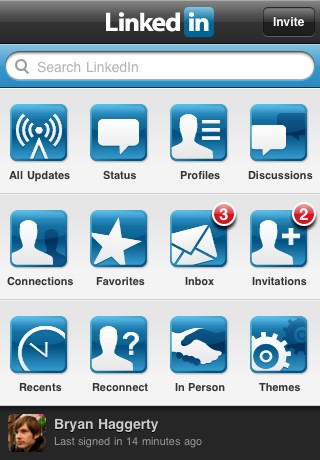
LinkedIn for iPhone v3.0

The Power of Search

Never walk into a meeting unprepared.  Whether it’s an interview, a client meeting, or a sales pitch, now you can go into any meeting knowing who you are going to meet with, and what you have in common.  LinkedIn for iPhone v3.0 includes a completely new search interface, making it trivial to easily find people whether they are in your connections list, or one of the 55 million professionals who now belong to LinkedIn.  Whether you type in a name or keyword, LinkedIn will get you the information you need whether it’s five days or five minutes before your important meeting.

The new application has revamped the profiles screen to quickly provide you:

  • A summary of details about the person
  • A review of their education & experience
  • A list of the people that you both know in common
  • The ability to mark that person a favorite

The new Favorites functionality makes it incredibly easy to keep track of people, so you can find them later in seconds.   In addition, all of the new Updates views let you filter your updates to see only updates from your favorite people.
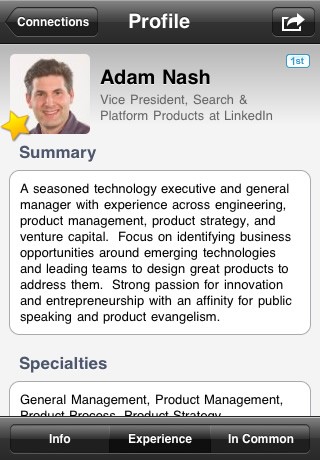
LinkedIn for iPhone: Profile

Your Professional Updates

Professionals increasingly need instant access to news and updates from their professional network. This new application also features a redesign of our updates functionality, giving you up to date intelligence about your network. There are now four modules to help you quickly check your updates: All Updates, Status Updates, Profile Updates, and Discussions.  You can even filter your updates to see only those from your favorite connections.

More importantly, these updates are now actionable. Based on heavy demand from our users, we have added the ability to read and submit comments on updates, right from the iPhone.
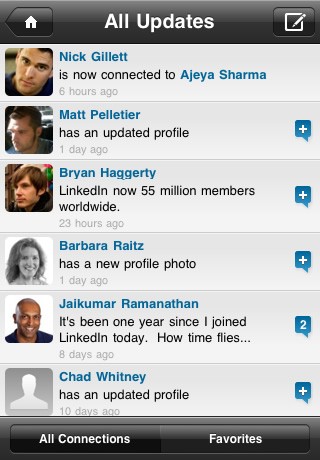
LinkedIn for iPhone: Updates

More Powerful Inbox & Addressbook Integration

The response to the recently launching Inbox on LinkedIn for iPhone v1.5 has been phenomenal. On average, our iPhone users are now checking their LinkedIn messages twice a day. v3.0 brings with it significant improvements to the Inbox, including an improved design, dashboard badging, and most importantly, support for sending invitations from a profile without the email address.

The Connections feature has been enhanced as well.  Now your connections are just a touch away, and you can easily send any of them a message on LinkedIn.  If your connection has a matching entry in your iPhone contacts, their phone numbers and email addresses will automatically show on their LinkedIn profile.  You can now also choose to download your connections into your iPhone contacts, and the application will alert you when you have a new connection who has not yet been downloaded.
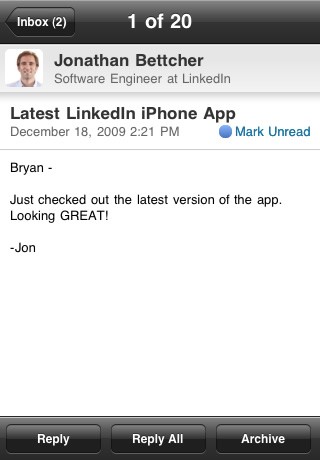
LinkedIn for iPhone: Invitations

Connect In Person

LinkedIn for iPhone has added a number of new features, but we expect many will want to try out In Person.  Leveraging the new Bluetooth capabilities in iPhone 3.0, In Person allows you to find and connect with other people running the LinkedIn application in real time.
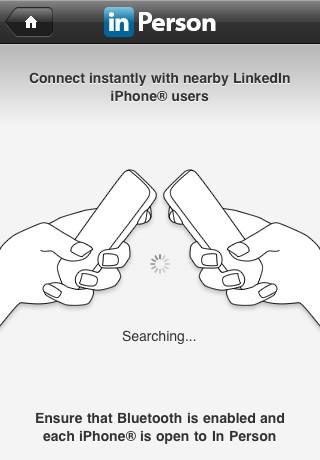
LinkedIn for iPhone: In Person

What are you waiting for?

There are too many features in the new application to detail them all here – the best way to get familiar with LinkedIn for iPhone v3.0 is to download it now.

This application represents just the beginning of our mobile efforts in 2010.   We’re just putting the finishing touches on our first native application for the Blackberry, and planning a long stretch of mobile products and enhancements in the year ahead.

If you are one of our LinkedIn for iPhone users, please join the conversation in the LinkedIn for iPhone group.  We’re very excited to hear from you and hear suggestions for new features and improvements.

Trackback: http://blog.linkedin.com/2009/12/28/linkedin-for-iphone-3-0-lets-get-this-party-started/trackback/
Add New Comment

Comments

  • Jay Cuthrell December 29th, 2009

    This is an insanely great update. Kudos!

     
  • Steve Ardire December 29th, 2009

    Hmmm…. first native application for the Blackberry ahead of Android ?

     
  • david toub December 29th, 2009

    I found what seems to be a bug in the new iPhone app. If I have a new contact, it’s nice that the app has a tag on it notifying me that I have one new contact. But after viewing that contact, it doesn’t appear on my regular aggregate list of contacts, and the tag on the app icon won’t go away.

     
  • Aitan Roubini December 29th, 2009

    I think the new app’s features are really great. But the icons on the front are really distracting and could use a redesign. The smaller icons on the interior pages are much nicer because they do not have the bevelled edge to them and are far more consistent in colour to the LinkedIn brand blue. Please fix the front icons to be slightly smaller and more consistent with the smaller icons which work very well.

     
  • Preston Smalley December 29th, 2009

    Well done! This is a solid app and builds many of the capabilities I’ve been wanting out of the app–I can tell what a user-centered process you must have run.

    The “IN-Person” business card exchange does bring to the forefront something I’ve long wondered about LinkedIn. If I just meet someone at a networking event I do want to keep track of that contact however I don’t want to add them as a 1st degree contact as I would not feel comfortable recommending them (at that point). I wish there was a way to collect business acquaintances that are at a different status than someone I’ve worked with for years and can recommend strongly.

     
  • Kostandinos December 29th, 2009

    Great upgrade!

    However, I’d still like to see groups added for viewing and to also be allowed to comment on topics. Editing profiles would also be a huge plus.

    All in all, keep up the good work! I’m finding myself using LinkedIn more frequently now. :)

     
  • Doug Richards December 29th, 2009

    Finally! The first version was really frustrating so this is a welcome (and anticipated) update. I love what I see so far in particular the reconnect feature, the increased image size and the home page layout. The entire application echoes the ease of use valued by iPhone addicts like myself.

     
  • Eric December 29th, 2009

    When will a better app for android be ready to go?

     
  • Mike Lazarus December 30th, 2009

    The Download Connections option is pointless without ability to link to contacts already on the device using email or name and show which contacts are linked (in LI app and Address Book) – doubling the size of my address book is not something I find useful.

    See the Facebook app for Blackberry as they do this really well.

    It should also have the ability to Download single contacts (without doing All)

    Also, I use LinkedIN Groups a lot and would really like this added to the phone apps (Blackberry and iPhone)

     
  • Josh Huston December 30th, 2009

    This is great! I have been waiting for a while for LinkedIn to do more with the iPhone app since the previous versions weren’t really useful.

    Favorite feature: Search
    To make it better: Advanced options and suggestions (for misspelling)

     
  • bob mont December 30th, 2009

    This is an excellent service and I, for one, appreciate the hard work that’s gone into making it such a valuable tool for business people to get connected. Keep up the good work. I’ll be looking forward to new innovations.

    Thanks – Bob M

     
  • Sruli December 30th, 2009

    I’m anxious to have a full-featured Linkedin app for Android. Any plans for one? There’s a few in the market, but none of them begin to come close to the iPhone app.

     
  • Darren Yan December 30th, 2009

    This is probably one of the best upgrades on my iPhone. Thanks for making this happen. I can now use LinkedIn on the move.

    Now how about making the Answers section available on the iPhone? That will be the icing on the cake.

    Regards,
    Darren

     
  • Jan-Evert Zondag December 31st, 2009

    Well done!

    On the iPhone users can mark a connection as ‘favorite’, thus being able to mark and unmark connections as ‘nearest neighbors’ in network space.

    So far, it is unclear to me where this ‘favorite’ mark is stored outside my iPhone application, e.g. in my LinkedIn settings or LinkedIn contacts list? Can I also access these marks using the website application?

     
    • Dirk Frey January 6th, 2010

      @Jan-Evert – This feature is specific to the iphone app at this point. Glad you like the new app!

       
  • Gryzo January 2nd, 2010

    For me it seems a major step backwards.
    In the new iphone app I can’t see the new connections of the people in my network.
    What I want is what one gets via the RSS feed.

    Does anyone know how one can revert to the old version of the app ?

     
  • mobiledj January 5th, 2010

    Fascinating. Looking forward to taking advantage of this technology during the new year.

     
  • Nick January 5th, 2010

    Another request for a native Android app. Now that Verizon has two great Droids, this is a necessity.

     
  • Giuseppe January 6th, 2010

    Fantastic interface, well done guys – I love it

     
  • Andrew Hearn January 6th, 2010

    Biggest improvement on this upgrade is the auto sign-in.

    It now feels much more like the Facebook app (no bad thing) and other than some minor bugs other people have already listed, this is a big step in the right direction.

     
  • Brooks Benson January 6th, 2010

    Adding my voice to the chorus of those requesting this app on Android.

    – Brooks

     
  • Dan Newman January 6th, 2010

    I’m having the same issue that David Toub reported on December 29th – any updates? Something we’re missing?

    “I found what seems to be a bug in the new iPhone app. If I have a new contact, it’s nice that the app has a tag on it notifying me that I have one new contact. But after viewing that contact, it doesn’t appear on my regular aggregate list of contacts, and the tag on the app icon won’t go away.”

     
    • Derek Homann January 22nd, 2010

      Our team is aware of it. It is something we will be addressing in a future update. Thanks.

      Derek
      LinkedIn Product Specialist

       
  • Hollis Taylor January 7th, 2010

    Lots of great information on this site. I stumbled across your site on Google, and I’m glad that I did… I’ve bookmarked your site and will check back regularly. Keep the good content coming!

    Hollis

     
  • James January 11th, 2010

    I would like to see some features for group managers… still, much improved. Nice job.

     
  • Mike January 13th, 2010

    Nice app, but I really do not want to choke my contact list by downloading all new connections to my phone. It would be nice to be able to selectively add (or not) them one at a time.

    I dont need them added to my phone – and by extension to my outlook contact list – Linked in gives me the access I need – when I want it.

     
  • Thomas January 15th, 2010

    I don’t want new connections added to my phonebook.
    So how do I clear/remove the number of new connections on the LinkedIn icon located on the iPhone dashboard?

     
  • Foråsidetslik January 18th, 2010

    This blog entry puts the use of LinkedIn in a different light for me. I have long used LinkedIn, but only on my PC, and now having the chance to use it on my iPhone, my complaints about LinkedIn are all gone. Now I can use it everywhere and as you mention: “Never walk into a meeting unprepared”. Just curious as to why the application has only received 3 out 6 stars in the iTunes store and if you are working on improving that?

     
  • Jordan Egbert January 19th, 2010

    I would love to see an App Developed for Android. With the release of Google’s Nexus One and the addition of other New Service providers offering the Andriod OS like Verizon and Sprint, I think it is ready.

     
  • V Rakesh January 20th, 2010

    Many congratulations!

    In truth, I came looking for an update on Linkedin for Blackberry! Glad to know that you are pushing to get it out!

    Am looking forward to that!

    Cheers

    Rakesh

     
  • davidburkus January 22nd, 2010

    What’s going on with the new connections showing up on the corner of the icon. I like being aware of who my new connections are, but it’s annoying since I can’t acknowledge them as seen and clear the giant “14″ in the corner of my LinkedIn icon.

    Honestly, I almost delete the app today because it was so distracting.

     
  • Dale Berkebile January 25th, 2010

    I am liking this new app. I am new to the iphone and apps though so it is taking a while to figure a few things out. I’m wondering if there is a way to manage groups and answer or ask question?

     
  • Scott January 25th, 2010

    Same Issue -

    I found what seems to be a bug in the new iPhone app. If I have a new contact, it’s nice that the app has a tag on it notifying me that I have one new contact. But after viewing that contact, it doesn’t appear on my regular aggregate list of contacts, and the tag on the app icon won’t go away.

     
    • Derek Homann January 26th, 2010

      @Scott- This functionality should be updated in our next update for the app. It should be rolling out shortly so keep an eye out for it.

       
  • Edmund Tan January 28th, 2010

    I have a problem that no one seems to have complained about yet – my Inbox on my iPhone LinkedIn App is empty even though when I am logged in via the web, it is obviously not. Does anyone have any solutions or is there somewhere I can goto for help?

     
    • Derek Homann February 2nd, 2010

      @Edmund- Have you tried to uninstall and reinstall the most current version of the app? If not, please try that first.

      Also, for a quicker response to your Customer Service issues, you may want to give our CS Center a try. http://bit.ly/9Z00NN

       
  • Gary Veasy January 28th, 2010

    I love this app and LinkedIn in general but I HATE the way the “New Connections” work – where LinkedIN gives you NO OPTIONS or preferences to download the contact info to your address book or not.

    There are some contacts I do NOT want in my phone. Do you know why? Because my phone’s address book synchs automatically with my desktop (and until this stupid feature that was fine). I want to be IN CONTROL of who gets added….that’s NOT LinkedIn’s role. Please fix this ASAP and remove the “feature” or make it a preference.

     
    • Derek Homann January 28th, 2010

      @Gary- This is an enhancement we will be making to the next update for the app. Please be on the lookout. It should be released int he near future.

       
  • Gary Veasy January 28th, 2010

    @ Derek – Thanks! In the meantime is there any way to prevent the contact info from populating your address book? I thought the update this week would take care of this but those that were tagged went in I think (and some were not new for some reason). I think the most recent update only removed them as new and removed the tag?

    Please do this soon. We all have a lot of data and info to manage without more being shoved down our throat. It is almost like spam in its aggressive “doing it my way” approach.

     
  • Mike Lazarus January 28th, 2010

    @Derek – you also need the ability to link to a contact that’s already there – even if the name is spelled wrong or they use a different email address

    How many people that use LinkedIN do you think would never have added one of their contacts to their own database before this release? At this time, that’s your very niche market.

     
    • Derek Homann January 29th, 2010

      @Gary @Mike Good feedback from both of you. While we don’t have options for this right now, it is feedback that we will make sure to pass it along to the right people.

       
  • Edmund Tan February 2nd, 2010

    @Derek – Actually I have but that did not work as well so I thought I would look for help online. Thanks for the link, I will head over there now.

     
  • android February 16th, 2010

    bravo! now on to Android!

     
  • eastmeadow February 23rd, 2010

    You guys keep playing carrot and stick with **Blackberry** users. You gave the press the app at CES and promised it would be available “real soon”.

    Some have guessed that there are more BB Linked In users than iPhone users so show us the money or at least post an honest update of timing..

     
  • Kevin Robb March 3rd, 2010

    Does anyone know how to add a company’s LinkedIn page to your favorites on LI for iPhone?

     
  • Damian Davila Rojas March 3rd, 2010

    I have the same problem as Edmund:

    “I have a problem that no one seems to have complained about yet – my Inbox on my iPhone LinkedIn App is empty even though when I am logged in via the web, it is obviously not. Does anyone have any solutions or is there somewhere I can go to for help?”

     
  • Talk Iphone March 17th, 2010

    Great post. I love how you can be connected to all your most important sites like LinkedIn to your iphone. I can’t enough of my iphone.

     
  • Markku Silen April 12th, 2010

    Can you use Discussion Groups with LinkedIn in iPhone ?

     
    • Mario Sundar April 12th, 2010

      @Markku,

      Not yet.

      /@mariosundar from @linkedin

       
  • Sandy Motteram May 27th, 2010

    Just want to add more weight behind the requests for a native Android application.

     
  • John Juhl May 29th, 2010

    Android version ASAP, please…

     
  • Sriram Ganapathy June 3rd, 2010

    I am using Linkedin App on Iphone. I am unable to view my Groups or look at Group discussions. This would be a great feature to have the next version of the App.

     
  • Jabari June 23rd, 2010

    Is there an Android version in the works?

     
  • titos September 1st, 2010

    I agree with Sriram – if we cannot view group discussions the use of the iphone app of linkedin is greatly impaired.

     
  • Orange County banners September 2nd, 2010

    As an Apple product Fan, I am very much satisfied with its product. No matter if, it is i-phone or i-pod.So, i am very much proud with it’s work and effort. And Thank you for supporting the product.

     
  • Chris September 8th, 2010

    This app is awesome. Just wish I could access my Linkedin Groups on it.

     
  • free android app September 27th, 2010

    Really nice one,Lucky me I found your site by accident, I bookmarked it.

     
  • Rui Brás Gomes October 5th, 2010

    Please Groups and discussion on linked in for IPhone… I would improve a lot the productivity of its users… Please an update!! Also the possibility of editing profile information and others

     
  • Ross October 13th, 2010

    I sent a long reply from my iPhone to an invitation I received, but I lost service temporarily (thanks, 3G network!) and it went into a black hole. I can’t find it anywhere, either on the site or via the app. One problem is that the app doesn’t show sent messages. Help!

     
  • cristina November 10th, 2010

    Please could you add a Groups tab on linkedin application…….I need to see the activity in my group discussions.

     
  • Mario Sundar December 16th, 2010

    @Steve and other folks who mentioned Android :)

    We’ve just launched a beta version of our Android app.

    http://blog.linkedin.com/2010/12/16/linkedin-android-beta/

    We’re glad we could get this out to you before the holidays. Look forward to your feedback.

     
  • Will Jeansonne February 15th, 2011

    How about an app for Windows Phone 7?

     
  • mallorcafinca1 February 20th, 2011

    Cool ! This is very interesting,

    Thanks

    Regards

     
  • Mike Perry June 3rd, 2011

    @Mario Sundar

    How did it go with the Android app launch?

    Mike Perry
    Webmaster, ScarHelpCenter
    http://www.scarhelpcenter.com

     
  • Pedro Marquez August 13th, 2011

    Interested in knowing the results you have gotten with the new app?


Add New Comment

This is a moderated site and comments will appear if and when they are approved. We will review the queue several times daily, so please don't resubmit if your comment doesn't appear immediately.